
VIISAN Document Scanners
Welcome to VIISAN, the newest member of the BDM ArcScan family. VIISAN Document Scanners offer high-quality, feature-rich scanning solutions ideal for home and professional users.
Enjoy the latest in Smart AI-driven imaging and scanning technology. This delivers exceptional performance, quality, and productivity. Their versatility and range of features make them ideal for many sectors. These include schools, libraries, archives, museums, offices and more.
Let advanced software save time. With automated editing and processing, images can be captured and ready to use in moments. This makes VIISAN document scanners highly effective and productive.
Discover with BDM ArcScan the very best of the VIISAN range. This includes the choice of 2 great A3 flatbed scanners, the VF3120 offering up to 1200 x 1200 dpi resolution or the even better VF3240 with 2400 x 2400 dpi resolution. There’s also the S21, a versatile A2-sized overhead scanner, perfect for contact-free scanning of books, documents and more.
Whatever your workflow, BDM ArcScan can help you find the right VIISAN document scanner, backed by 12 months of FREE technical support through our TechAssist service.

Why choose VIISAN document scanners?
-
Affordable and dependable scanning across a wide range of applications
-
High-resolution flatbed scanners ideal for home or office use
-
Wide range of overhead scanning solutions, including A2
-
Simple and intuitive designs that improve accessibility
-
Excellent, feature-rich software for editing and automation
-
Strong value for users who need quality without high-end costs
VIISAN scanners are popular for
-
Document scanning
-
Photo scanning
- Book scanning
- Sketches and drawings
-
Newspapers and magazines
-
Affordable everyday scanning
VIISAN scanners are ideal for
-
Photographers and photo studios
-
Archivists and preservation teams
-
Libraries and education settings
-
Small offices and home offices
-
Designers and creative studios
-
Museums and heritage organisations
-
Admin teams for everyday scanning
Discover the latest VIISAN Document Scanners range

VIISAN S21 Overhead A2 Document Scanner
Ideal for large format scanning, the VIISAN S21 Overhead A2 Document Scanner offers great quality scanning for documents and drawings. There’s also a dedicated book scanning mode, which corrects page curvature.
Key specs
-
Scan size: Up to A2
- Resolution: 20.1 megapixels
- Sensor: CMOS
- Connectivity: USB
Who’s it for?
- Home and office users
- Simple and easy scanning
- Scanning large format items
- Overhead, contact free design
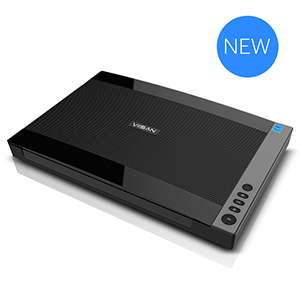
VIISAN VF3120 A3 Flatbed Document Scanner
Featuring an impressive 1200 x 1200 dpi resolution, the VIISAN VF3120 A3 Flatbed Document Scanner delivers outstanding clarity with advanced software ideal for digitising photos, documents, books, artwork, and more.
Key specs
-
Scan size: Up to A3
- Optical resolution: Up to 1200 dpi
- Sensor: CIS
- Connectivity: USB
Who’s it for?
-
Home and office users
-
High-resolution scanning
-
Great for documents
- Easy to use software
VIISAN VF3240 A3 Flatbed Document Scanner
With stunning 2400 x 2400 dpi resolution, the VIISAN VF3240 A3 Flatbed Document Scanner captures in the greatest detail with advanced software perfect for scanning photos, documents, books and much more.
Key specs
-
Scan size: Up to A3
- Optical resolution: Up to 2400 dpi
- Sensor: CIS
- Connectivity: USB
Who’s it for?
-
Home and office users
-
Super high-resolution scanning
-
Great for documents
-
Easy to use software
Prices shown exclude UK VAT and delivery charges (if applicable). Please see product listing for further information.
VIISAN Document Scanners – Making everyday scanning simple
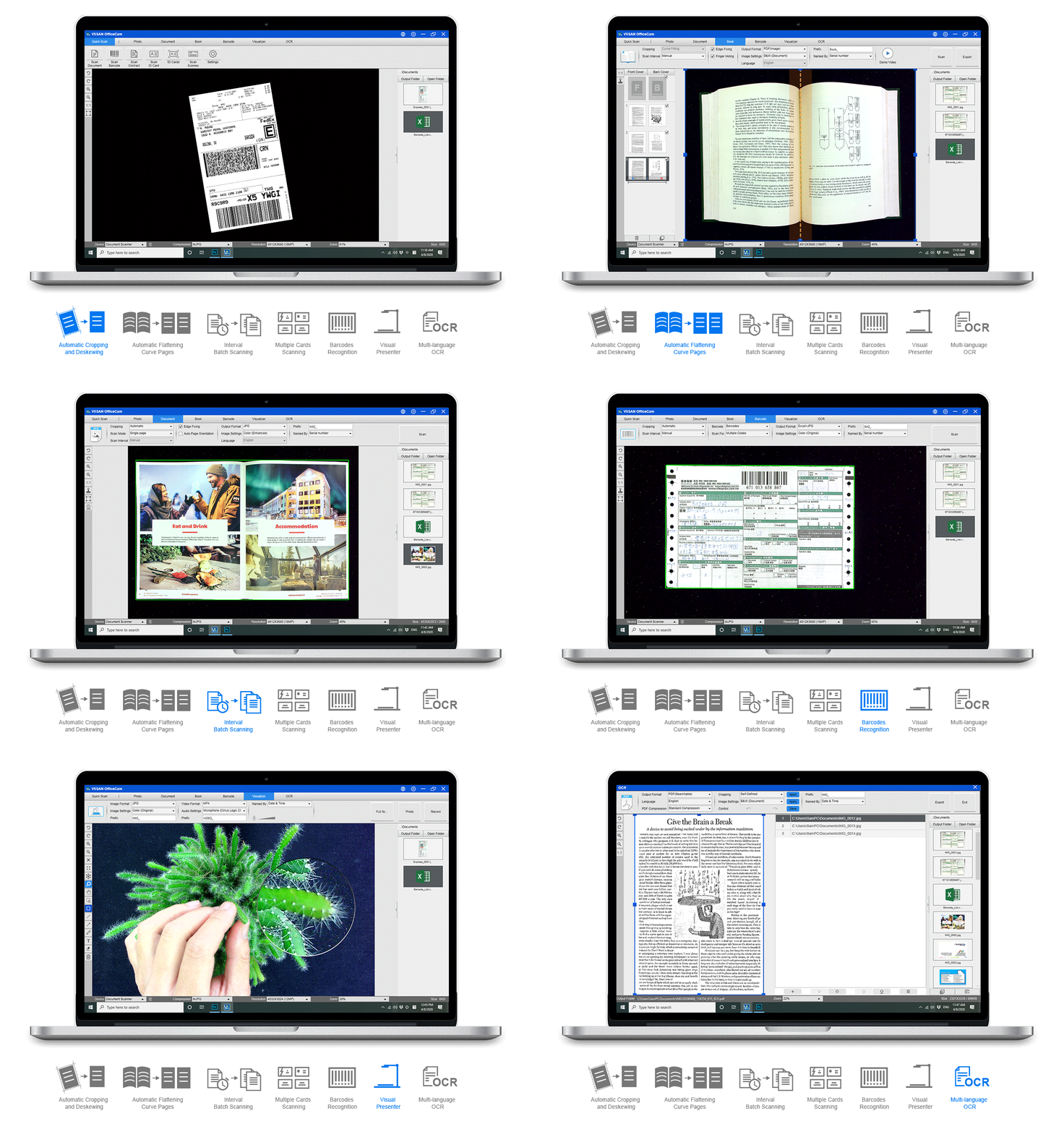
VIISAN OfficeCam for S21
VIISAN OfficeCam software gives the S21 even greater flexibility by combining image capture, editing and file conversion in one easy workflow.
It helps users create practical, high-quality digital files from books, documents and other materials quickly and efficiently. With support for formats such as JPG, searchable PDF, text PDF, Word, Excel, text and EPUB, it offers a versatile solution for a wide range of scanning needs.
The software also includes useful features to improve results and speed up processing, including automatic page flattening, finger removal, damaged edge repair, text-based page rotation and automatic double-page splitting.
OCR support for up to 130 languages adds even more value, helping users create searchable and accessible digital content with ease. There’s also text-to-speech recognition and barcode recognition.
Altogether, VIISAN OfficeCam software makes the S21 a more powerful and user-friendly scanning solution for everyday capture workflows.
VIISAN ViiScan for VF3120/VF3240
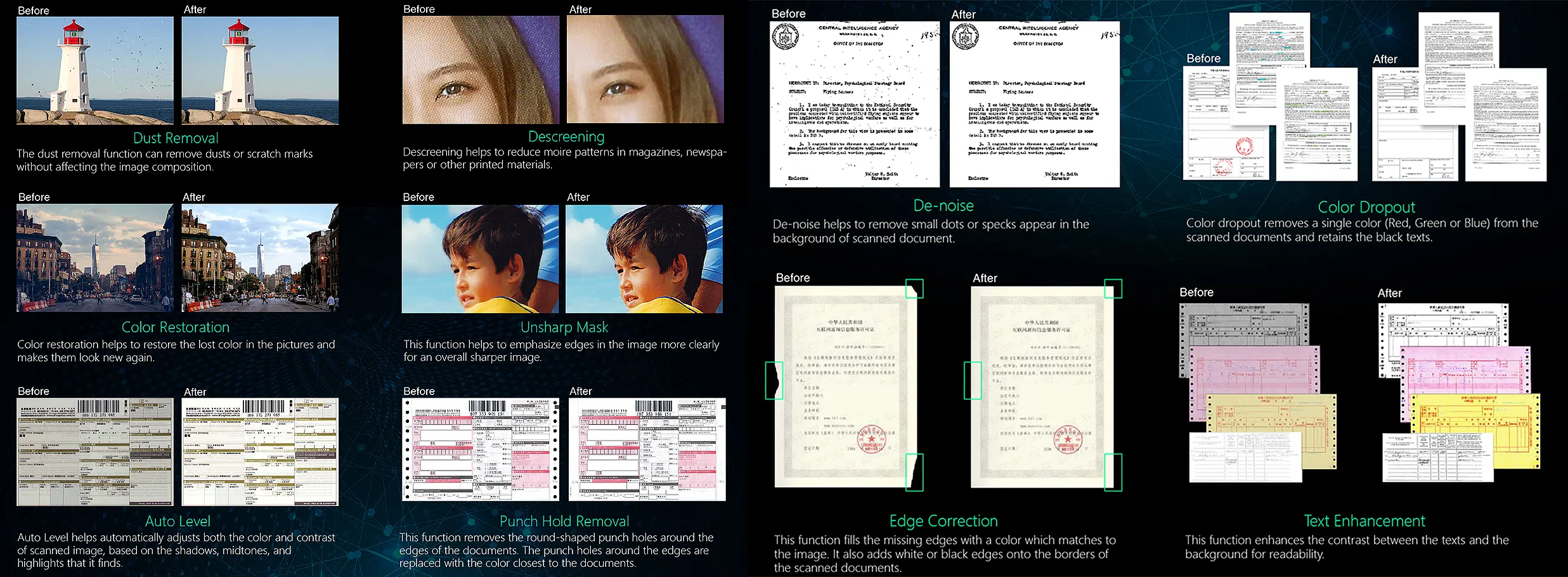
VIISAN ViiScan software gives you more than simple image capture. It adds a wide range of smart image processing tools that help improve scan quality, reduce manual editing and make everyday workflows more efficient.
Designed to support VIISAN flatbed scanners, it helps you create cleaner, clearer and more usable digital files from documents, photos, books, magazines and other originals. Useful features include dust removal, descreening, colour restoration, unsharp mask, auto level, de-noise, edge correction, text enhancement and colour dropout.
The software can also help remove punch holes and improve faded or low-contrast documents, making scanned content easier to read and more suitable for storage, sharing and day-to-day use.
Altogether, VIISAN ViiScan software adds real value by combining image capture with practical enhancement tools that help you achieve better results with less effort.

BDM ArcScan TechAssist: Free technical support for 12 months on all VIISAN document scanners
Every VIISAN purchase includes 12 months of TechAssist, our complete technical support service at no extra cost. Get help when you need it with telephone, email and remote access support, so you can set up quickly and keep scanning smoothly from day one.
-
Telephone support for quick answers
-
Email support for follow-ups and guidance
-
Remote access support to help resolve setup issues faster
-
Help with installation and setup advice
-
Guidance on scan settings and workflows
Click to find out more!
VIISAN Document Scanners FAQs
What is the difference between these VIISAN Document Scanners – the S21, VF3120 and VF3240?
The VIISAN S21 is an A2 overhead document camera scanner, while the VF3120 and VF3240 are A3 flatbed scanners. The S21 is better suited to larger items such as books, journals, newspapers and maps, whereas the VF3120 and VF3240 are designed for flat scanning of documents, photos, books, magazines and other large originals.
What is the VIISAN S21 best used for?
The VIISAN S21 is ideal for scanning items up to A2 in size, including large books, journals, manuscripts, newspapers and maps. It is also designed to capture books and documents. The contact-free, overhead design is great for handling fragile or delicate items that can’t be positioned on a flatbed scanner, for example.
What are the VF3120 and VF3240 best used for?
The VF3120 and VF3240 are versatile flatbed scanners. They are best suited to scanning items such as documents, books, magazines, newspapers and other large-format documents. Their frameless, narrow-border design also helps when scanning oversized or awkward originals.
What is the difference between the VF3120 and VF3240?
The main difference is speed and optical resolution. The VF3240 offers a faster scanning speed of 4 seconds at 200 dpi, A3 colour and a maximum optical resolution of 2400 x 2400 dpi, while the VF3120 offers 8 seconds at 200 dpi, A3 colour and 1200 x 1200 dpi optical resolution. Please note, the VF3240’s ability to scan at 2400 dpi is dependent on the operating system – please see the product’s page for information and clarification.
Does the VIISAN S21 include OCR?
Yes. The VIISAN S21 includes built-in OCR and can convert scanned files into searchable PDF and editable Word, Excel and Text formats. VIISAN states that OCR supports more than 130 languages. The OCR also supports text-to-speech plus barcode recognition.
Does the VIISAN S21 have a book scanning mode?
It sure does with dedicated book scanning mode. This mode carries many automated tasks such as automatic page flattening, finger removal, damaged edge repair and automatic double-page splitting. It all helps make your scans ready to use straight away, reducing post-editing. There’s OCR to make text word-searchable, great for finding information quickly.
What software do the VF3120 and VF3240 use?
The VF3120 and VF3240 are supplied with ViiScan, a feature-rich software that makes document scanning quick and easy. With many automated enhancements, you may not need to carry out any post-editing, while features such as scan to folder, PDF, email plus OCR help with productivity and workflow.
Are the VF3120 and VF3240 suitable for scanning photographs and artwork?
The VIISAN VF3120 and VF3240 both use CIS scanning technology. For very flat originals, such as sketches, drawings and similar materials, CIS technology can deliver very good results. However, compared with CCD-based scanners, CIS technology has less depth of field and a narrower colour gamut. As a result, colours may need some adjustment in post-editing, while textured originals, such as oil or acrylic artworks, may show less surface definition. If you are not sure how they might work with your items, please contact us.
Is the VIISAN S21 suitable for high-resolution artwork and photo scanning?
Not really, if you are capturing the item at full A2 size, and true optical resolution is important. The S21’s native image resolution is 5104 × 3924 pixels, and while the OfficeCam software can output up to 600 dpi, that higher figure is created through software interpolation rather than true optical capture. In short, it can produce a good reference scan, but it may not be suitable for reproduction or archival-quality scanning. If you are unsure, please contact us for further help and advice.
Do the VF3120 and VF3240 support Mac and PC?
Yes. VIISAN states that its A3 flatbed scanner range supports PC and Mac, and its current download pages list drivers for Windows, macOS and even Linux Ubuntu for the VF3120 and VF3240.
Which VIISAN model should I choose?
Choose the S21 if you need to scan larger A2 material or want the flexibility of an overhead scanner, which is contact-free. Choose the VF3120 if you need an A3 flatbed scanner for general high-quality capture. Choose the VF3240 if you want the same A3 flatbed format with higher optical resolution and faster scanning speed.
Why choose BDM ArcScan for VIISAN document scanners?
Expert Advice
With over 25 years of experience within the digitisation sector, you can trust BDM ArcScan to always be offering you the best expert advice and support. Whether you’re just about to start digitising, looking to improve existing projects or upgrading to the latest solutions, we can help you make that first step or make your projects work even better.
Customer Support
BDM ArcScan prides itself on offering exceptional customer care that ensures you always have our advice and support close to hand. Our fully trained sales and support teams know all there is to know about all things digital, so no question is too small or too big. Available by telephone, email and online chat, we are never too far away.
Fully managed services
Our project management team will make your digitisation project work seamlessly. Working closely with you, your project is our number one priority, so we ensure everything is carefully arranged and managed to suit your needs. With us taking care of collections, processing, sorting, and returning, you are always kept up to date to ensure your project is completed on time without compromise.
Complete in-house digitisation studio
Our state-of-the-art digitisation studio has been created to cover all forms of digitisation possible. From document, photo, and film to book and large format scanning, we have it covered. Run and managed by our in-house digitisation team, you can rest assured your project is in the safest hands possible with every step fully managed including collection, returning and if required, disposal.
Fully trained technical team
Sometimes things don’t go to plan so that’s why BDM ArcScan has a fully trained support team available to get you back on track in no time at all. Our team is often able to respond and resolve technical questions in less than one hour with telephone and remote support. This all helps to reduce downtime and gives our customers that extra peace of mind that we are never too far away to help.
Installation, setup, and training
Benefit from having your equipment professionally installed and set up to ensure you get the best results possible. Covering the UK, we can also provide complete user training on equipment features and software, ensuring you have the best possible start to begin your projects quickly without delay. Additionally, we also offer after care service and support plans including extended warranties for that extra peace of mind.
Please Note: Level of service/s offered can vary from product to product and is based on the level of service purchased. Some services may not be available or may be limited to certain products or levels of service purchased. Please check specific product pages for more information or ask a member of the team for more information.
Product model images/videos shown may show/include additional options, accessories and/or features available at additional cost. For additional information, please refer to the product key features, product specification table and datasheet information. Features, specifications, software, and any additional information provided may be subject to change or revision without notice.
Any automatic processing features and benefits mentioned are intended to aid user experience, but results may vary depending on your usage and the media being scanned. Any errors or inaccuracies with automatic processing features and benefits do not indicate an error with the functionality of the scanner.
Equipment performance, features and capabilities are based on using the equipment’s proprietary included software. The use of the equipment with any third-party software is not guaranteed or implied, and guidance should be sought from the third-party software manufacturer or vendor to ensure compatibility with your intended usage. BDM ArcScan does not provide such advice, guidance, or support pre or post-sale.
Equipment features and benefits may vary depending on the operating system version, configuration, and type. As such, differences in functionality and available features may occur. Please refer to the datasheet and specification information of the equipment fully to check if any such differences exist, especially between Windows and Mac operating systems. E&OE.