Plustek Scanners
Versatile scanning solutions for documents, photographs, film and specialist originals.


Plustek Scanner Specialists
With specialist knowledge across the Plustek scanner range, we’ll help you choose the right model for your requirements and workflow.
12-months TechAsist
Fast UK Delivery
With reliable UK delivery, we’ll help get your Plustek scanner to you quickly so you can get up and running sooner.
Expert advice
With over 30 years of experience and knowledge, we provide expert guidance and support from initial enquiry through to installation and beyond.
Why Choose a Plustek Scanner?
Plustek scanners are a strong choice for users who need reliable flatbed or film scanning without stepping into the cost of more specialist high-end systems.
Their range covers everything from everyday documents and photographs to books, artwork, slides and negatives, with dedicated designs for more specialist originals and user requirements.
- Scan documents, photographs and artwork with excellent detail
- Digitise slides and negatives with dedicated film scanning models
- Choose book-edge scanners for bound and delicate material
- Benefit from CCD technology on selected high-quality flatbed models
- Access specialist scanning features at a more affordable price point
With dedicated solutions for flatbed, book and film scanning, Plustek offers a practical balance of image quality, specialist capability and value for a wide range of digitisation projects.
Explore our range of Plustek Scanners
A3 Flatbed Scanners
Plustek OpticSlim 1180
Compact A3 scanning for photos and everyday documents.
The Plustek OpticSlim 1180 A3 Flatbed Scanner uses CIS technology to deliver reliable A3 scanning in a compact design, making it ideal for offices or home use with limited space.
- Up to A3 scan size
- 1200 dpi optical resolution
- CIS image sensor
- USB 2.0
£249.00 (ex. VAT) / £298.80 (inc. VAT)

Plustek OpticPro 360E
High-resolution scanning ideal for artwork and more.
Designed for high-speed A3 scanning, the Plustek OpticPro A360E uses CCD technology to capture large-format documents, artwork, and detailed originals with accuracy.
- Up to A3 scan size
- 600 optical dpi resolution
- CCD image sensor
- USB 2.0
£459.00 (ex. VAT) / £550.80 (inc. VAT)
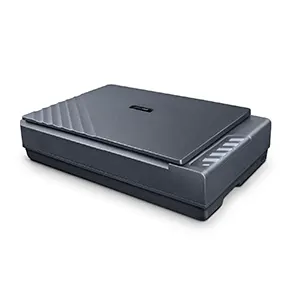
Plustek OpticPro A390
Advanced CCD scanning with adjustable lighting
New for 2026, the Plustek OpticPro A390 features two-way adjustable lighting, allowing illumination to be adapted to different scanning objects. Ideal for artwork and items with depth/texture.
- Up to A3 scan size
- 600 optical dpi resolution
- CCD image sensor
- USB 3.2
£897.00 (ex. VAT) / £1,076.40 (inc. VAT)
Plustek OpticBook A300
Unique book edge design to safely scan bound items
Designed for efficient A3 book scanning, the Plustek OpticBook A300 Plus uses a book-edge design to minimise spine shadow and distortion while reducing pressure on bound materials.
- Up to A3 scan size
- 600 dpi optical resolution
- CCD image sensor
- USB 2.0
£1,369.00 (ex. VAT) / £1,642.80 (inc. VAT)
Plustek Film Scanners
Plustek OpticFilm 135i
Simple, fast and effortless scanning for slides, film and negatives
Designed for easy 35mm film digitisation, the Plustek OpticFilm 135i offers automated batch scanning for slides and negatives, making photo archiving faster and more convenient.
- Scan 35mm film, slides & negatives
- 7200 dpi optical resolution
- CCD image sensor
- 3.3 Dmax value
- USB 2.0
£448.00 (ex. VAT) / £537.60 (inc. VAT)
Plustek OpticFilm 120
Professional, high-quality scanning for standard and medium formats
Built for professional film digitisation, the Plustek OpticFilm 120 scans 35mm and medium format film with great detail, making it ideal for demanding archive and photo workflows.
- Scan 35mm film, slides, negs & medium format
- 5300 optical dpi resolution
- CCD image sensor
- 4.1 Dmax value
- USB 2.0
£1,799.00 (ex. VAT) / £2,158.80 (inc. VAT)
Prices are shown without and with UK VAT. Delivery charges may apply — please refer to individual product listings or your checkout basket for more details.
Plustek Scanners – Making everyday scanning simple

DocAction
Plustek’s DocAction software adds extra convenience to supported Plustek Scanners, helping users complete common scanning tasks more quickly and with less manual input. It is designed to make everyday workflows simpler and more efficient.
With one-touch operation, users can send scans straight to email, folders, printers, or file formats such as PDF, TIFF, and JPEG, making document handling faster and easier.
DocAction also supports OCR functions, allowing users to create searchable PDFs and editable text files that are easier to store, organise, and retrieve later.
For office, admin, and archive environments, DocAction helps users save time, reduce repetitive steps, and get more from their Plustek Scanners every day.

QuickScan Plus
Plustek’s QuickScan Plus software is designed to make film scanning easier, giving users a simple way to digitise slides and negatives with less effort. It is built for convenient image capture, editing, and sharing.
The software features an intuitive interface, so users can quickly view scanned images and make adjustments without a complicated workflow. This makes photo archiving more accessible to both enthusiasts and regular film users.
QuickScan Plus also includes image enhancement tools to improve picture quality, increase light sensitivity, and reduce image noise. Users can see adjustments instantly, helping them refine scans more efficiently.
For added flexibility, scanned images can be exported to third-party editing software and shared more easily online.

SilverFast Ai Studio 9
Included with the Plustek OpticFilm 120, SilverFast Ai Studio 9 adds advanced software tools for users who want more control over film scanning results.
As one of the world’s leading names in scanner software, SilverFast is widely used for professional-quality digitisation and image refinement.
Features such as Multi-Exposure and IT8 colour calibration help improve detail, dynamic range, and colour accuracy, making it easier to achieve high-quality scans from 35mm and medium format film.
For photographers, archivists, and specialist film users, SilverFast Ai Studio 9 adds extra value to the Plustek OpticFilm 120 by supporting a more precise and professional scanning workflow.
Software availability and compatibility vary by scanner model and operating system. Please check individual product pages for further details.

BDM ArcScan TechAssist: Free for 12 months on all Plustek scanners
Every Plustek purchase includes 12 months of TechAssist, our support service at no extra cost. Get help when you need it with telephone, email and remote access support, so you can set up quickly and keep scanning smoothly from day one.
-
Telephone support for quick answers
-
Email support for follow-ups and guidance
-
Remote access support to help resolve setup issues faster
-
Help with installation and setup
-
Guidance on scan settings and workflows
Click to find out more!
Plustek Scanners FAQs
Your Title Goes Here
Your content goes here. Edit or remove this text inline or in the module Content settings. You can also style every aspect of this content in the module Design settings and even apply custom CSS to this text in the module Advanced settings.
Which Plustek Scanners are best for film scanning?
Plustek offers dedicated film scanners for users digitising slides and negatives. The Plustek OpticFilm 135i is a strong option for easy 35mm film scanning with automated batch handling, while the Plustek OpticFilm 120 is better suited to higher-end workflows and supports both 35mm and medium format film.
Which Plustek Scanners are best for books and bound materials?
Which Plustek Scanners are best for books and bound materials?
For books, reports, and bound documents, the Plustek OpticBook A300 Plus is a strong choice. Its book-edge design helps reduce spine shadow and distortion, making it more suitable for bound materials than a standard flatbed scanner.
Do Plustek Scanners include flatbed models?
Yes, Plustek offers a range of flatbed scanners for different tasks. These include general document and photo scanning models, book-edge scanners for bound originals, and CCD flatbed scanners designed for more detail-focused work such as artwork and large-format originals.
Which Plustek Scanners are best for artwork and detailed originals?
For artwork and other detail-critical originals, CCD-based flatbed models are often the best fit. The OpticPro A360E and the new OpticBook A390 are designed for accurate A3 scanning, making them a good option for larger documents, artwork, and visually detailed originals.
Do Plustek Scanners include flatbed models?
Yes. Plustek offers flatbed scanners for a variety of applications, from everyday A3 document scanning through to books, artwork and detailed originals. Models include the OpticSlim 1180 for general A3 scanning, the OpticBook A300 Plus for bound material and the OpticPro A390 for more demanding image capture, such as for artwork.
What is the difference between the OpticSlim 1180 and OpticPro A390?
Both models provide A3 flatbed scanning, but they are designed for different applications.
The OpticSlim 1180 uses CIS technology and is a practical choice for documents, drawings, newspapers and general office scanning. The OpticPro A390 uses CCD technology and is better suited to artwork, photographs, textured materials and originals where greater depth of field and image detail are important.
Your Title Goes Here
Your content goes here. Edit or remove this text inline or in the module Content settings. You can also style every aspect of this content in the module Design settings and even apply custom CSS to this text in the module Advanced settings.
Can Plustek Scanners create searchable PDFs?
Can Plustek Scanners create searchable PDFs?
Yes, compatible Plustek scanners can create searchable PDF files using the OCR functions provided through their supported scanning software.
This allows recognised typed or printed text within scanned documents to be searched, helping make digital records easier to organise, locate and retrieve. Available OCR functions and software vary between scanner models.
Which Plustek Scanners are best for photographers?
Which Plustek Scanners are best for photographers?
For 35mm film, the OpticFilm 135i provides automated scanning of slides and negatives. Photographers, both amateur and professional, who also work with 120 medium format film should consider the OpticFilm 120 Pro, which supports both 35mm and medium format originals with excellent image quality and advanced editing software.
What is the difference between the OpticFilm 135i and OpticFilm 120 Pro?
The OpticFilm 135i is designed specifically around 35mm film and provides convenient automated batch scanning of slides and film strips. The OpticFilm 120 Pro is a higher-end professional scanner supporting both 35mm and 120 medium format film, making it better suited to photographers and archives working with multiple film formats.
What is the new Plustek OpticPro A390?
The new Plustek OpticPro A390 is an A3 CCD flatbed scanner designed for professional document, artwork and image capture.
It combines a large scanning area with selectable single or dual light source modes, allowing illumination to be adapted for standard documents as well as textured or dimensional originals.
It is a strong option for creative, archival, heritage and professional digitisation applications.
Are Plustek Scanners a good choice for affordable scanning?
Yes. Plustek offers scanner options across a range of budgets, making the brand particularly attractive where a dedicated scanner is required without moving immediately to higher-cost production equipment.
The range includes practical A3 flatbeds, specialist book scanners and dedicated film scanners for photographic digitisation.
Can Plustek A3 flatbed scanners scan film, slides and negatives?
No. Plustek’s current A3 flatbed scanners are designed for reflective originals such as documents, photographs, artwork and books, and do not include the transparency unit required to scan film, slides or negatives.
If you need a flatbed scanner that can handle both reflective and transparent media, take a look at the Microtek range. Models such as the ArtixScan F2 A4 flatbed and ArtixScan 3200XL A3 flatbed use CCD technology and combine conventional flatbed scanning for documents, photos and artwork with built-in transparency scanning capabilities for film and other transparent originals.
Why buy from BDM ArcScan?
We’re more than just an online store — we’re document scanning specialists with over 30 years of experience. We work with all the key scanner brands and take pride in providing expert advice, personal service and ongoing support. From helping you choose the right equipment to 12 months of FREE TechAssist and our outsourced scanning bureau, we’re here to support you before, during and after your purchase.
Expert help choosing the right scanner
Not sure which Ricoh document scanner is right for your needs? Our expert team can help you compare models and features, matching the right scanner to your requirements and workflow so you can choose with confidence.
12 months of TechAssist included
Every new scanner purchase comes with 12 months of TechAssist FREE, giving you priority telephone, email and remote support whenever you need a helping hand with setup, software or those little technical issues.
Let us take care of your scanning
Our outsourced document scanning bureau can handle everything from one-off archive projects to ongoing scanning requirements, helping you save time, free up space and reduce the burden on your internal team.
Please Note – Product model images/videos shown may show/include additional options, accessories and/or features available at additional cost. For additional information, please refer to product key features, product specification table and datasheet information. Features, specifications, software, and any additional information provided may be subject to change or revision without notice.
Any automatic processing features and benefits mentioned are intended to aid user experience, but results may vary depending on your usage and the media being scanned. Any errors or inaccuracies with automatic processing features and benefits do not indicate an error with the functionality of the scanner.
Equipment performance, features and capabilities are based on using the equipment’s proprietary included software. The use of the equipment with any third-party software is not guaranteed or implied and guidance should be sought from the third-party software manufacturer or vendor to ensure compatibility with your intended usage. BDM ArcScan does not provide such advice, guidance, or support pre or post-sale.
Equipment features and benefits may vary depending on the operating system version, configuration, and type. As such, differences in functionality and available features may occur. Please refer to the datasheet and specification information of the equipment fully to check if any such differences exist, especially between Windows and Mac operating systems. E&OE.