Network Scanners for Teams & Workgroups
Shared Scanning. Smarter Workflows. Built for Teams.
Our range of network and workgroup scanners makes it easy for teams and departments to share scanning equipment across the workplace. Designed for busy offices and collaborative environments, these scanners help streamline document capture and improve everyday productivity.
Ideal for scanning invoices, contracts, forms, records and other business documents, network scanners allow multiple users to access scanning equipment without relying on a dedicated scanner for every workstation.
Choose from models offering Ethernet or Wi-Fi connectivity, touchscreen operation and direct scanning to network folders, email or supported cloud services. Depending on the model and software, features such as OCR and searchable PDF creation can help simplify document processing and distribution.
From compact A4 network scanners to higher-capacity A3 workgroup scanning solutions, our range provides options for different team sizes, document volumes and workflows. Whether you’re scanning occasional documents or handling larger daily workloads, there’s a solution to suit your requirements.
Explore our complete range of Network & Workgroup Scanners from leading manufacturers. At BDM ArcScan, we can help you find the right equipment for your workplace, connectivity requirements, and document management needs.

12-months TechAsist
Telephone, email and remote-access support included with every scanner.
Fast UK Delivery
Reliable UK delivery to get you up and running sooner.
Expert Advice
Friendly advice to help you choose the right scanner for your requirements.
Secure Checkout
Shop securely with safe online payment and checkout processing.
Why Choose a Network Scanner?
Network scanners are designed to make document capture easier for teams, departments and shared office environments.
They’re ideal for organisations that need multiple users to access the same scanner and send documents directly to shared destinations.
- Share one scanner across multiple users and teams
- Scan directly to email, network folders or cloud destinations
- Reduce reliance on individual PCs or workstations
- Speed up document capture with duplex scanning and ADFs
- Improve collaboration with shared digital workflows
From small offices to larger departments, our range includes network scanners designed to support different team sizes, workloads and document-management requirements.
Our range includes models from brands such as Epson and Ricoh to suit different applications and budgets.
Discover Our Network Scanners Range
Showing all 7 resultsSorted by price: low to high
-

Ricoh fi-8040 40 ppm A4 Desktop ADF Workgroup Document Scanner
£249.00 (ex. VAT) / £298.80 (inc. VAT) -

Epson WorkForce DS-730N A4 Sheet-Fed Desktop Network Scanner
£293.00 (ex. VAT) / £351.60 (inc. VAT) -

Epson WorkForce ES-590W A4 Wi-Fi Sheet-Fed Document Scanner
£339.00 (ex. VAT) / £406.80 (inc. VAT) -
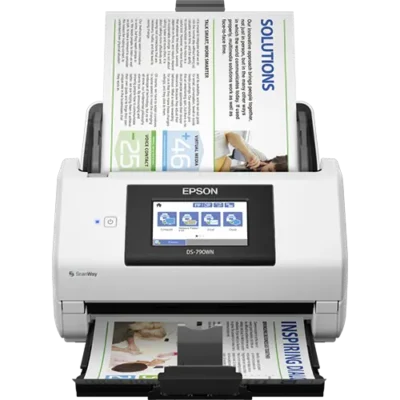
Epson WorkForce DS-790WN A4 Network Multi-User Document Scanner
£514.00 (ex. VAT) / £616.80 (inc. VAT) -

Epson WorkForce DS-800WN A4 Network Multi-User Document Scanner
£669.00 (ex. VAT) / £802.80 (inc. VAT) -

Ricoh fi-7300NX 60 ppm A4 Network Workgroup ADF Document Scanner
£738.00 (ex. VAT) / £885.60 (inc. VAT) -

Ricoh N7100E 25 ppm A4 Stand-alone Network Document Scanner
£915.00 (ex. VAT) / £1,098.00 (inc. VAT)
All prices shown with and without UK VAT. Delivery charges may apply, please see product listing or checkout basket for more information.
Need Help Choosing the Right Network Scanner?
Network and workgroup scanners provide a flexible and efficient way to capture, share and manage documents across your workplace. From compact network scanners for smaller teams to high-performance systems for busy departments, choosing the right equipment can help improve productivity, simplify document workflows and support collaborative working.
At BDM ArcScan, we offer a comprehensive range of network and workgroup scanners from leading manufacturers. Whether you’re upgrading existing equipment or introducing shared scanning across your organisation, our team can help you find the right solution based on your document types, scanning volumes, connectivity requirements and budget.
Network Scanners FAQs
Your Title Goes Here
Your content goes here. Edit or remove this text inline or in the module Content settings. You can also style every aspect of this content in the module Design settings and even apply custom CSS to this text in the module Advanced settings.
What is a network scanner?
What’s the difference between a network and a workgroup scanner?
The terms often overlap, but they describe slightly different things. A network scanner refers primarily to how the device connects and shares scans across a network, while a workgroup scanner is designed to handle the workload of several users within a team or department.
Many scanners are both network-enabled and workgroup-ready, combining shared connectivity with faster speeds, larger document feeders and more robust paper handling.
How many people can share a network scanner?
The number of users depends on the scanner, network setup and how frequently it will be used. A compact network scanner may be ideal for a small office or team, while higher-capacity workgroup models are designed for larger departments with multiple users scanning throughout the day.
For busy environments, consider the scanner’s speed, ADF capacity and recommended daily scanning volume as well as the number of people sharing it.
Do network scanners work without a PC?
Yes, some network scanners can complete common scanning tasks without being controlled from a computer.
Models with built-in touchscreens can allow users to select preconfigured workflows and scan directly to destinations such as email, network folders or cloud services, depending on the scanner. This can make shared scanning quicker and easier in reception areas, admin departments and other busy workspaces.
Can network and workgroup scanners scan to shared folders and email?
Yes. Many network scanners can send documents directly to shared network folders and email destinations, helping teams route information to the right person, department or filing location.
Available destinations and setup requirements vary between models, so it’s worth checking compatibility with your network and preferred workflow before choosing a scanner.
Can network scanners scan directly to cloud services?
Some models support scanning to cloud-based destinations, either directly from the scanner or through supplied software and connected services.
Cloud scanning can be useful for organisations using shared document storage or remote working workflows. If a particular cloud platform is important to your business, check that it is supported by the scanner and whether any additional configuration or software is required.
Your Title Goes Here
Your content goes here. Edit or remove this text inline or in the module Content settings. You can also style every aspect of this content in the module Design settings and even apply custom CSS to this text in the module Advanced settings.
Can different users have their own scan shortcuts and destinations?
Yes, selected network and workgroup scanners allow user-specific profiles, favourites or predefined scanning shortcuts to be configured.
This can give individual users or departments quick access to their preferred scan settings and destinations, reducing repetitive setup and helping maintain consistent workflows. Features vary by model, so check the available user and touchscreen functions if personalised workflows are important.
Can network scanners create searchable PDFs with OCR?
Yes. Many network and workgroup scanners include OCR (Optical Character Recognition) software that can convert scanned documents into searchable PDF files.
Searchable PDFs allow users to find information by searching for words, names or reference numbers within scanned documents, making them particularly useful for digital filing, document management and records retrieval.
How Do I Choose the Right Scanning Speed and Daily Volume?
Choose a scanner based on how much your team expects to scan and how often the device will be shared.
Look at pages per minute (ppm), images per minute (ipm), ADF capacity and recommended daily scanning volume. Smaller teams with occasional requirements may not need the fastest model, while busy departments processing batches throughout the day will benefit from higher speeds, larger feeders and more robust paper handling.
Are Network Scanners Suitable for Scanning Invoices and Financial Documents?
Yes. Network and workgroup scanners are well suited to accounts, invoice processing and finance departments, particularly where several people need to capture or access documents.
Features such as batch scanning, duplex capture, OCR and scan-to-folder can help teams digitise invoices, statements, purchase orders and other financial paperwork efficiently while making records easier to file and retrieve.
What security features should I look for in a network scanner?
If documents contain confidential or sensitive information, look for a scanner that provides appropriate network security, user access controls and administrative settings for your organisation.
Depending on the model, features may include user authentication, controlled scan destinations, secure network communication and administrator-managed settings. The scanner should also fit within your organisation’s wider IT and data-security policies.
Will a Network Scanner Work with My Existing Network?
Most network scanners can be integrated into a standard business network, although configuration will depend on your IT environment, security settings and the destinations you want to use.
Every new scanner purchase from BDM ArcScan includes 12 months of TechAssist at no extra cost, with telephone, email and remote support. We can help with practical setup guidance and supported workflows such as scan-to-folder, scan-to-email and searchable PDF creation.
Why buy from BDM ArcScan?
We’re more than just an online store — we’re document scanning specialists with over 30 years of experience. We work with all the key scanner brands and take pride in providing expert advice, personal service and ongoing support. From helping you choose the right equipment to 12 months of FREE TechAssist and our outsourced scanning bureau, we’re here to support you before, during and after your purchase.
Expert help choosing the right scanner
Not sure which scanner is right for your needs? Our expert team can help you compare models and features, matching the right scanner to your requirements and workflow so you can choose with confidence.
12 months of TechAssist included
Every new scanner purchase comes with 12 months of TechAssist FREE, giving you priority telephone, email and remote support whenever you need a helping hand with setup, software or those little technical issues.
Let us take care of your scanning
Our outsourced document scanning bureau can handle everything from one-off archive projects to ongoing scanning requirements, helping you save time, free up space and reduce the burden on your internal team.
Please Note – Product model images/videos shown may show/include additional options, accessories and/or features available at additional cost. For additional information, please refer to product key features, product specification table and datasheet information. Features, specifications, software, and any additional information provided may be subject to change or revision without notice.
Any automatic processing features and benefits mentioned are intended to aid user experience, but results may vary depending on your usage and the media being scanned. Any errors or inaccuracies with automatic processing features and benefits do not indicate an error with the functionality of the scanner.
Equipment performance, features and capabilities are based on using the equipment’s proprietary included software. The use of the equipment with any third-party software is not guaranteed or implied and guidance should be sought from the third-party software manufacturer or vendor to ensure compatibility with your intended usage. BDM ArcScan does not provide such advice, guidance, or support pre or post-sale.
Equipment features and benefits may vary depending on the operating system version, configuration, and type. As such, differences in functionality and available features may occur. Please refer to the datasheet and specification information of the equipment fully to check if any such differences exist, especially between Windows and Mac operating systems. E&OE.