
Looking for the best book scanners?
The best book scanners make it easier to digitise books, records, archives and bound documents without damaging the originals.
Whether you manage a library, archive, school, university or business, choosing the right scanner depends on the size of your documents, the volume you need to scan, and whether you need features such as OCR, searchable PDFs or overhead scanning.
In this guide, we explain what to look for when choosing a book scanner, the key features that matter, and how to find the right model for your organisation’s scanning needs.
Why Choose BDM ArcScan for Book Scanners?
With over 30 years of experience working in the heritage sector, BDM ArcScan understands the care, precision and quality needed when digitising books, archives and bound records.
We work with libraries, museums, universities and heritage organisations to help them choose scanning solutions that protect delicate materials while improving access, productivity and long-term preservation.

What to Look for in a Book Scanner
Gentle handling
A good book scanner should allow you to scan bound materials without forcing books flat or damaging the spine.
This is especially important for fragile, rare or historical items where preservation is just as important as digitisation.
Look out for overhead scanners – they capture contact-free to minimise handling and models with V-Shaped cradles to support books.
Image quality
Are you scanning for quick referencing or preservation? Consider the main purpose of your scans.
For quick referencing, clear and searchable files may be enough. For preservation, you’ll need higher image quality to capture fine details, annotations, illustrations, page texture and the condition of the original material.
Capture size
Consider the size and type of materials you need to scan. Books may contain loose leaves or folded diagrams.
Some book scanners are designed for standard books, while others can handle A3 pages, oversized volumes, loose documents, maps or bound records.
Image processing
Look for book scanners with helpful image processing features that can transform originals without lots of post-editing required.
Features such as automatic cropping, page flattening, finger removal, background clean-up and colour correction can save time while producing cleaner, more consistent scans.
Word searchable files
Using Optical Character Recognition, or OCR, the scanned text from your scans is converted into searchable digital content.
This is useful for libraries, archives and businesses that need to quickly find information within scanned books, records or documents.
Productivity
The right scanner should fit the way your organisation works and the project goals.
Features such as fast capture speeds, easy software, batch processing and simple export options can help make digitisation projects more efficient.
Our Best Book Scanners

Best for value – CZUR Shine Ultra Pro
If you’re on a tight budget, you may think you need to compromise on features and quality. Think again.
The CZUR Shine Ultra Pro offers great value, with a strong range of features designed to make book scanning quick and easy.
Capturing documents up to A3 size, it delivers 24MP resolution alongside useful features such as automatic cropping, page flattening and more, helping you achieve clean, consistent results with minimal post-editing.
Key Features
- Scan up to A3 in size
- 24MP resolution (A4 – 440; A3 – 320 dpi)
- 1 second scan speed
- Automatic page cropping and flattening
- Book scanning mode
- OCR processing
- Compact and lightweight
- USB connectivity
- Support for Windows and Mac OS

Best for large format – Viisan S21
An affordable A2 overhead scanner? Fiction or fact? Face with the Viisan S21, a versatile overhead scanner capable of scanning at up to A2 in size.
With a 21MP image sensor, it’s great for reference quality scanning, plus it has dedicated scanning modes for documents and books to get the best results from them.
Key Features
- Scan up to A2 in size
- 21MP resolution
- 1 second scan speed
- Automatic page cropping and flattening
- Book scanning mode
- OCR processing
- Compact and lightweight
- USB connectivity
- Support for Windows and Mac OS

Best all-arounder – CZUR ET-series
The CZUR ET-Series is one of the best book solutions around. Available in a choice of models from 16MP up to 40MP, each is packed full of clever tech.
Benefit from laser-assisted page flattening, advanced LED overhead and side lighting, and smart page optimisation to get great results in seconds!
Key Features
- Scan up to A3 in size
- 16MP to 40MP model options
- 1.5-second scan speed for 2 pages
- Advanced LED lighting to reduce glare/reflection
- Advanced page flattening technology
- Smart automatic image optimisation
- OCR processing
- USB connectivity
- Support for Windows and Mac OS

Best for libraries – CZUR M3000 V3
Based on the ET Series, the M3000 V3 builds on its features with the addition of an adjustable scanning platen and an enhanced 48MP HD image sensor.
The result is a full-featured overhead scanner at a fraction of the price of many rival models.
Combined with clever software, it offers a practical and cost-effective solution for libraries, archives and heritage organisations.
Key Features
- Scan up to A3 in size
- HD 48MP model image sensor
- Adjustable scanning platten
- 1.5-second scan speed for 2 pages
- Advanced LED lighting to reduce glare/reflection
- Advanced page flattening technology
- Smart automatic image optimisation
- OCR processing
- USB connectivity
- Support for Windows and Mac OS
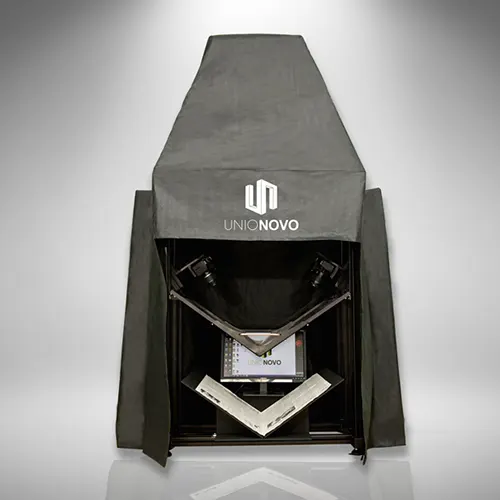
Best for professionals – Unionovo CII
Discover the Unionovo CNII, an A3 V-shaped book cradle designed to deliver high-quality image capture, with dual DSLR cameras scanning each page in exceptional detail.
Quick, efficient and easy to use, the CNII brings professional scanning technology to an affordable price point, making it a smart choice for effective book digitisation and preservation.
Key Features
- Scan up to A3 in size
- Dual DLSR cameras – choice of models
- V-Shaped cradle and platten
- 1-second scan speed for 2 pages
- Cool-lit, UV-Free LED lighting
- Captures pages perfectly flat without digital correction
- Percise image adjustment
- Support for Windows OS
- Also available in A2 size (CN I)
Looking for the best book scanners? FAQs
What is the best book scanner for libraries and archives?
The best book scanner depends on the type, size and condition of the material you need to scan. Libraries and archives often benefit from overhead scanners or V-shaped book cradles, as these help protect bound materials while capturing high-quality digital images.
What is the difference between a flatbed scanner and a book scanner?
A flatbed scanner requires books to be placed face down, which can put pressure on the spine. A book scanner captures pages from above, helping reduce handling while offering features such as page flattening, automatic cropping and image correction.
How does page flattening and page splitting work?
Page flattening and page splitting are usually handled by the scanner’s software. Page flattening helps correct the natural curve of a book page, while page splitting detects the left and right pages of an open book and saves them separately. Together, these tools improve readability, reduce manual editing and can help OCR software create more accurate searchable files.
Can book scanners be used for fragile or rare books?
Yes, many book scanners are designed to support careful handling of fragile, rare or historical books. For preservation work, look for features such as overhead scanning, a book cradle, high-resolution capture and minimal contact with the original material.
Do I need OCR when scanning books?
OCR, or Optical Character Recognition, converts scanned text into searchable digital content. This is useful if you want to create searchable PDFs, improve access to archived material or make scanned books easier to reference.
What size book scanner do I need?
This depends on the size of the material you are scanning. A4 may be enough for standard books and documents, while A3 book scanners offer more flexibility for larger volumes, oversized pages, records, maps and bound materials.
How much does a book scanner cost?
Book scanner prices vary depending on scan size, image quality, camera resolution, software and handling features. Entry-level overhead scanners can suit smaller projects, while professional systems with book cradles and advanced imaging tools are better suited to libraries, archives and high-volume digitisation.
Need Help Choosing the Right and Best Book Scanners?
Finding the best book scanner depends on your material type, scanning volume, image quality needs and budget. At BDM ArcScan, we use our experience in the heritage, archive and document capture sectors to help you choose a solution that fits your organisation.
Contact our team today for friendly advice on finding the right book scanner for your project.