
CIS vs CCD Scanners: What’s the Difference?
Choosing the right scanner is easier when you understand the technology behind them and what types of media you are looking to scan.
Two common scanner sensor types are CIS and CCD. Both are used to capture digital images, but they work in different ways and are suited to different scanning needs.
For simple document scanning, CIS technology can offer a compact and efficient solution. For higher-quality work involving photographs, artwork, film, books or uneven originals, CCD scanners are often preferred because they can deliver better depth, colour and image detail.
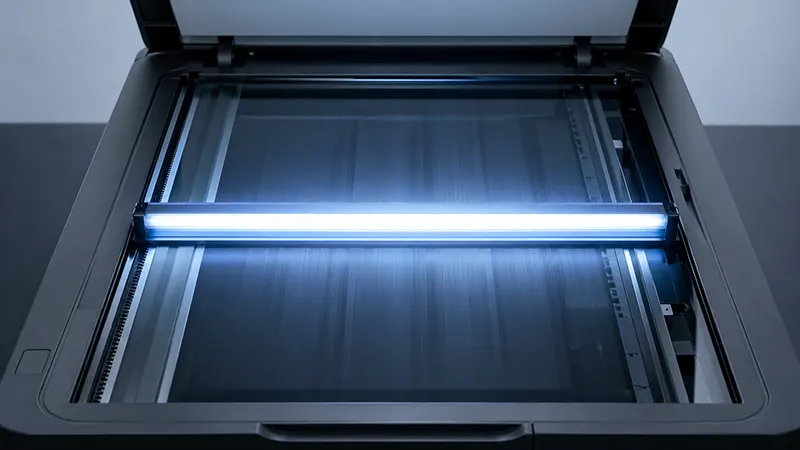
What Is a CIS Scanner?
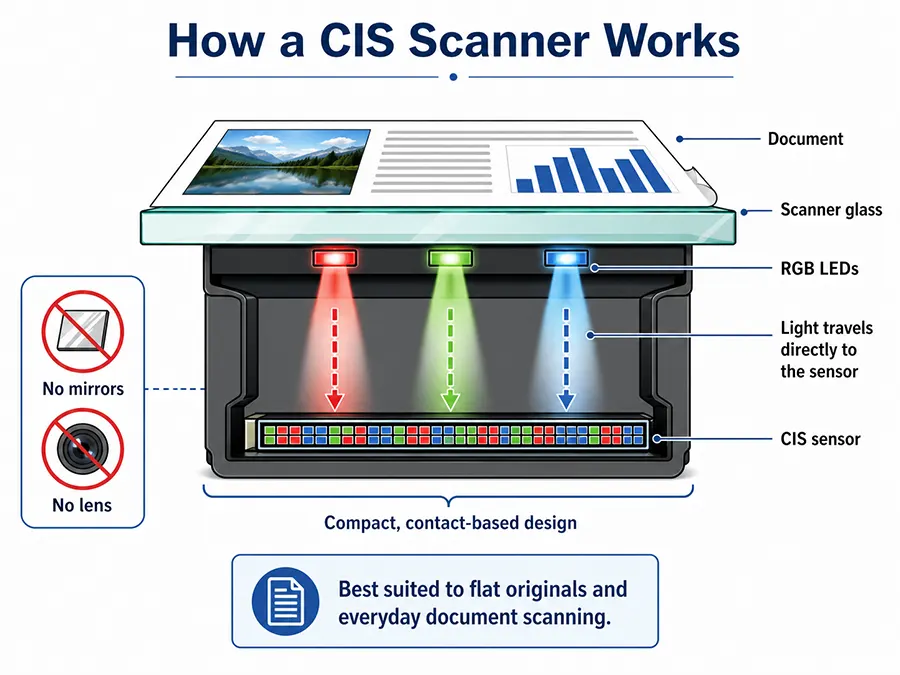
CIS stands for Contact Image Sensor. In a CIS scanner, the sensor sits very close to the document being scanned. This makes the scanner slimmer, lighter and more energy efficient.
CIS scanners are commonly used for everyday document scanning, office paperwork and portable scanning devices. They work best when the original is flat and in close contact with the scanner glass or scanning surface.
What Is a CCD Scanner?
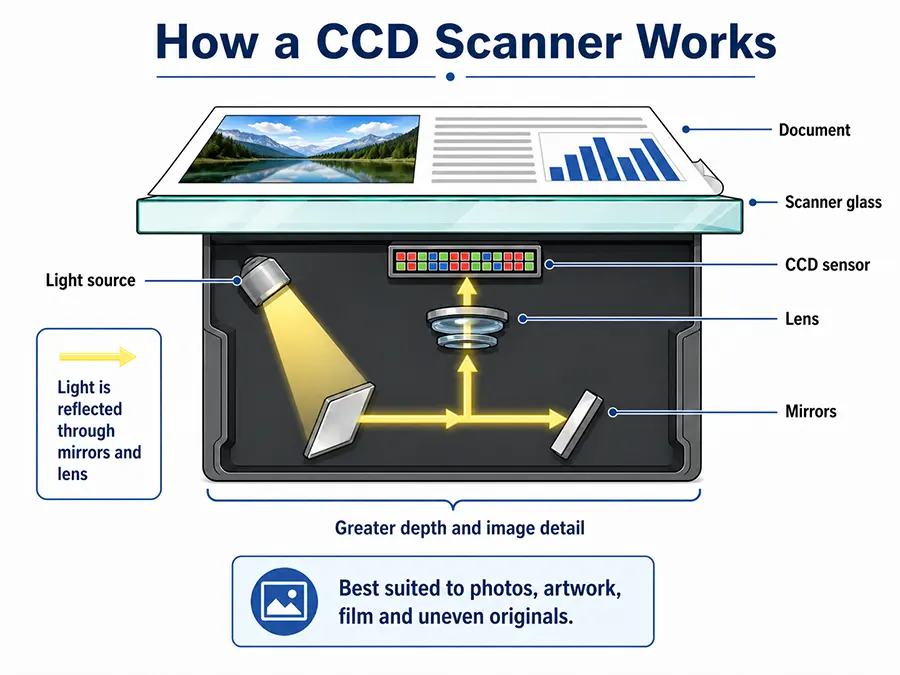
CCD stands for Charge-Coupled Device. A CCD scanner uses mirrors and lenses to capture the image and direct it to the sensor. This allows the scanner to capture more depth and detail, especially when the original is not perfectly flat.
CCD technology is often found in higher-quality flatbed scanners, film scanners and professional imaging systems. It is a strong choice for scanning photographs, artwork, books, film, transparencies and archive material.
CIS vs CCD Scanners: What benefits does each one offer?
Benefits of CIS Scanners
CIS scanners are popular because they are compact and efficient. They are often found in smaller desktop scanners, portable scanners and office devices where speed, size and convenience are important.
They are a good option for users who mainly scan flat paper documents and do not need advanced image quality or depth capture.
Benefits of CCD Scanners
CCD scanners are designed to capture more detail, depth and tonal range. This makes them better suited to scanning originals that are not completely flat, such as books, textured artwork, photographs or mounted materials.
For film and photography, CCD technology can also help deliver stronger colour reproduction and more accurate image detail, making it a preferred option for professional and archive use.
CIS vs CCD Scanners: Which is best for my needs?
When Should You Choose a CIS Scanner?
A CIS scanner may be the right choice if you mainly scan:
- Office documents
- Receipts
- Forms
- Letters
- Simple paperwork
- Flat originals
CIS technology is ideal when you need a compact and affordable scanner for everyday use.
When Should You Choose a CCD Scanner?
A CCD scanner is usually the better choice if you scan:
- Photographs
- Film and slides
- Artwork and fragile originals
- Books/Bound documents
- Archive collections
- Materials with texture or depth
CCD technology is better suited to users who need higher image quality, accurate colour and more flexibility across different material types.
CIS vs CCD Scanners: Which ones do you suggest?
Our CIS Scanner Top Picks

Best CIS document scanner – ScanSnap iX2500
Key Features
- Scan A4 and smaller documents
- Dual CIS scanners – scans both sides at once
- Fast 45 ppm output
- Easy to use controls and design
- Helps optimise images
- OCR processing
- Desktop-friendly design
- USB, WiFi and Bluetooth connectivity
- Support for Windows and Mac OS

Best CIS flatbed scanner – Viisan VF3120
Compact, quick and versatile, the VIISAN VF3120 is a strong A3 flatbed choice for users who want a slim CIS scanner for documents, books, magazines, photos and larger flat originals.
With 1200 x 1200 dpi optical resolution and fast A3 scanning, it offers practical everyday performance for home, office and education use.
It also features OCR software, PDF creation and output formats including JPEG, PNG, TIFF and multi-page PDF, making it useful for organised document capture
Key Features
- Scan up to A3 in size
- 1200 x 1200 dpi optical resolution
- Colour 48-bit Input / 24-bit Output
- Scan A3 page in under 8 seconds (200 dpi colour)
- Smart image processing
- OCR to create word-searchable PDFs
- Compact and lightweight
- USB connectivity
- Support for Windows and Mac OS
Our CCD Scanner Top Picks
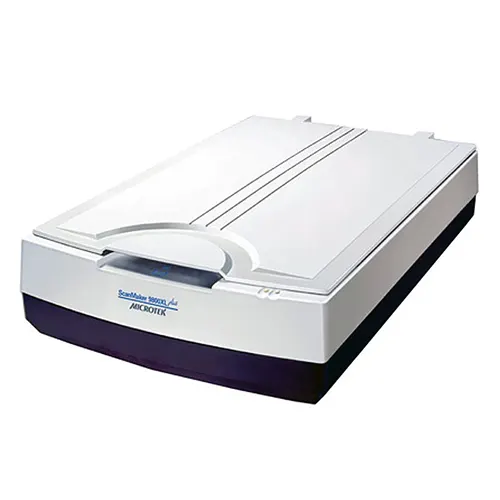
Best for CCD scanner for documents – Microtek ScanMaker 9800XL Plus
Ideal for larger originals, the Microtek ScanMaker 9800XL Plus is a great choice for scanning A3 documents, archive material, photographs and artwork.
With 1600 dpi optical resolution, a large flatbed scan area and Microtek’s CCD scanning technology, it captures clear, detailed images with excellent depth and colour accuracy.
This makes it well-suited to users who need reliable results across a wide range of flat or textured materials.
Key Features
- A3-sized flatbed scanner
- 1600 dpi optical resolution
- One-touch scan button
- Microtek ColoRescue™ colour restoration
- Tri-wavelength LEDs
- Easy-to-use software included
- Support for Windows and Mac OS

Best CCD scanner for film and archiving – Microtek ArtixScan 3200XL
Designed for demanding imaging, pre-press and digitisation work, the Microtek ArtixScan 3200XL offers high-resolution capture, excellent image detail and professional colour performance.
Its large A3 scan area makes it well suited to photographs, artwork, textured originals, transparencies, archive material and other specialist items that require careful, accurate scanning.
For photographers, artists, studios, archives, print professionals and organisations managing high-quality digitisation projects, it provides the precision and flexibility needed for more complex collections.
Key Features
- A3-sized flatbed scanner
- Scan 35mm slides/filmstrips, 4″ x 5″ film, and medium format from 6 x 4.5-cm up to 6 x 17-cm panoramic film
- 3200 dpi optical resolution
- 4.2 Dmax level
- One-touch scan button
- Microtek ColoRescue™ colour restoration
- Multiple sampling noise reduction
- Tri-wavelength LEDs
- Includes SilverFast Ai Studio 9 software
- Support for Windows and Mac OS
CIS vs CCD Scanners? FAQs
Is CIS or CCD better for scanning?
CCD is usually better for high-quality scanning, especially for photos, film, artwork and archive material. CIS is better suited to everyday document scanning where compact size, speed and affordability are more important.
What does CIS mean in scanning?
CIS stands for Contact Image Sensor. It is a scanner sensor type that captures the image from very close to the scanning surface. CIS scanners are often slim, lightweight and energy efficient.
What does CCD mean in scanning?
CCD stands for Charge-Coupled Device. A CCD scanner uses mirrors and lenses to capture the image and direct it to the sensor. This helps improve depth, detail and image quality.
Are CCD scanners better for film scanning?
Yes, CCD scanners are generally better suited to film scanning because they can capture fine detail, colour and tonal range more effectively. They are often used in professional film and flatbed scanners with transparency support.
Are CIS scanners good for documents?
Yes, CIS scanners are well suited to everyday document scanning. They are often used for office documents, forms, receipts and paperwork where the originals are flat and image quality requirements are straightforward.
Which scanner type is best for archives?
For archive work, CCD scanners are often preferred because they offer better image quality, depth and colour accuracy. However, the best scanner also depends on the material being scanned, such as documents, books, photographs, film or fragile originals.
Still not sure if CIS or CCD is best for your needs?
Choosing between a CIS or CCD scanner depends on your material type, scanning volume, image quality needs and budget. At BDM ArcScan, we use our experience in the heritage, archive and document capture sectors to help you understand the differences and choose a solution that fits your organisation.
Contact our team today for friendly advice on finding the right scanner for your project.