

Epson WorkForce DS-70 A4 Portable Document Scanner
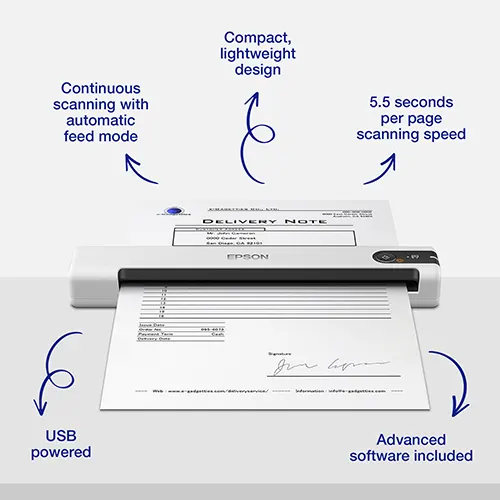
The Epson WorkForce DS-70 is a compact, USB-powered scanner offering advanced software, automatic feed mode, and flexible, high-performance scanning—ideal for mobile professionals or tight workspaces.
Epson Super Sale Price!
£85.00 (ex. VAT) / £102.00 (inc. VAT)
+ Delivery - £10.00 (ex. VAT)/£12.00 (inc. VAT)
In stock for fast UK Dispatch
12 months free TechAssist support
1 year product warranty
Epson WorkForce DS-70 Overview
Meet the Epson WorkForce DS-70, a compact A4 portable document scanner designed for users who need simple scanning away from a full office setup.
Its lightweight USB-powered design makes it ideal for mobile workers, home offices and small workspaces where desk space is limited.
With fast single-sheet scanning, Epson ScanSmart software and support for everyday paperwork such as forms, letters, receipts and ID documents, the DS-70 helps users turn paper into organised digital files quickly and easily.
Key Features of the Epson WorkForce DS-70
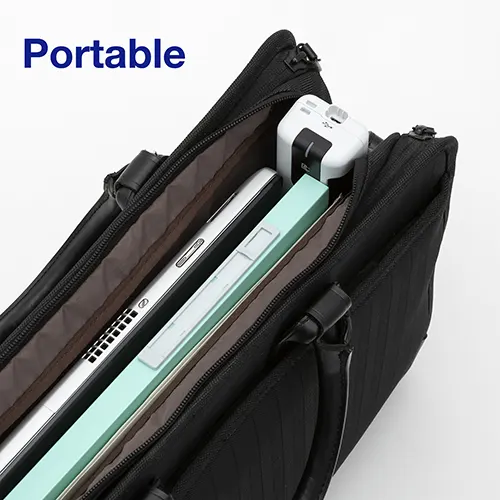
Portable scanning with Epson WorkForce DS-70
Scan paperwork wherever work takes you with a compact, lightweight A4 scanner designed for mobile workers, home offices and space-limited desks.
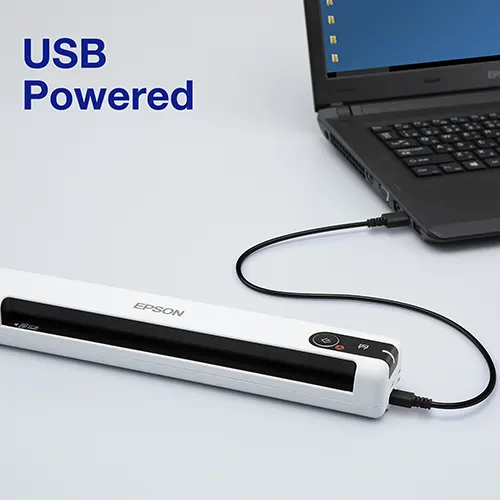
USB-powered convenience
Power and connect the Epson WorkForce DS-70 through a single USB cable, keeping setup simple without needing a separate power adapter or bulky desktop scanner.
Fast single-sheet document capture
Digitise forms, letters, receipts and everyday paperwork quickly, making it easier to stay organised when working remotely or away from the office.
Space-saving Epson WorkForce DS-70 design
The Epson WorkForce DS-70 fits neatly into bags, drawers and small workspaces, giving users practical document scanning without taking over the desk.
Epson software included
Epson Document Capture Pro software helps users save, organise and share scanned files easily, supporting smoother document management for mobile work, expenses and everyday admin.
The Epson WorkForce DS-70 is best for
Mobile workers, home offices and small workspaces that need quick, simple scanning without a bulky desktop device. With its slim USB-powered design, the Epson WorkForce DS-70 makes it easy to digitise forms, receipts, letters and everyday paperwork wherever space is limited.
FAQs
Is the Epson WorkForce DS-70 good for mobile working?
Yes. The Epson WorkForce DS-70 is compact, lightweight and USB-powered, making it a practical choice for mobile workers who need to scan paperwork from home, on the road or between workspaces.
Does it need a separate power adapter?
No. The DS-70 is powered through USB, so one cable handles both power and connection. This keeps the setup simple and helps reduce clutter.
What documents can the Epson WorkForce DS-70 scan?
It is designed for everyday A4 paperwork, including forms, letters, receipts, invoices and business documents. This makes the DS-70 useful for expenses, admin tasks and quick document capture.
Is it suitable for scanning lots of pages at once?
The Epson WorkForce DS-70 is best for quick single-sheet scanning rather than large batches. For higher-volume scanning, an ADF document scanner would be a better fit, and we offer a full range from Epson to help.
What software comes with the Epson WorkForce DS-70?
Epson Document Capture Pro software helps save, organise and share scanned files, making it easier to manage paperwork, receipts and documents after scanning.
Does Epson make a portable scanner with Wi-Fi and mobile scanning?
Yes. If you like the compact style of the Epson WorkForce DS-70 but need wireless scanning, the Epson WorkForce DS-80W is the better option. It adds Wi-Fi, a built-in battery and Epson Smart Panel support, allowing users to scan to compatible smartphones and tablets without being tied to a USB connection.
Technical Specification
| Scanner type | Mobile scanner |
| Max/min document size | Legal, Business cards, A4 , A5, A6, A7, A8, B5, B6, Postcard, Letter, Plastic cards |
| Optical tesolution | Up to 600 dpi optical |
| Sensor type | Single CIS |
| Colour depth | Input: 48 Bits Colour / 16 Bits Monochrome, Output: 24 Bits Colour / 8 Bits Monochrome |
| Scan speed | 5.5 seconds per page (A4, 200/300 dpi) |
| Duplex Scanning | No – simplex |
| ADF Capacity | 1 sheet |
| Daily scan duty cycle | 300 sheets |
| Paper weight | 35 to 275 gsm |
| Multi-feed detection | N/A |
| Connectivity | USB 2.0 |
| Power supply | USB |
| Included software | Document Capture Pro, Epson Scan 2 |
| OCR processing | Yes |
| Other software features | One-touch scanning, colour dropout/enhancement, blank page removal, hole punch removal, auto de-skew, auto-rotation, text enhancement, edge fill, advanced cropping, descreening and predefined scan settings. |
| Supported file formats | BMP, JPEG, TIFF, multi-TIFF, PDF, searchable PDF, PDF/A, PNG |
| Driver support | TWAIN, WIA, ISIS, SANE (Linux), ICA (Mac) |
| Supported operating systems | Windows and Mac |
| Dimensions | 272 x 47 x 34 mm (Width x Depth x Height) |
| Weight | 0.27 kg |
| Warranty | 1-year return to base warranty |
| What’s in the box? | USB cable, User guide. Software via download. |
For full technical details, please refer to the product datasheet.
Only logged in customers who have purchased this product may leave a review.

TechAssist - We've got you covered
Every hardware purchase from BDM ArcScan now includes 12 months of FREE TechAssist support, worth over £120.00.
TechAssist gives you direct access to our support team for help with setup, troubleshooting and everyday technical questions.
Support is available by email, phone or remote session, so we can guide you through issues quickly and help keep your scanner running smoothly.
Please Note – Product model images/videos shown may show/include additional options, accessories and/or features available at additional cost. For additional information, please refer to product key features, product specification table and datasheet information. Features, specifications, software, and any additional information provided may be subject to change or revision without notice.
Any automatic processing features and benefits mentioned are intended to aid user experience, but results may vary depending on your usage and the media being scanned. Any errors or inaccuracies with automatic processing features and benefits do not indicate an error with the functionality of the scanner.
Equipment performance, features and capabilities are based on using the equipment’s proprietary included software. The use of the equipment with any third-party software is not guaranteed or implied and guidance should be sought from the third-party software manufacturer or vendor to ensure compatibility with your intended usage. BDM ArcScan does not provide such advice, guidance, or support pre or post-sale.
Equipment features and benefits may vary depending on the operating system version, configuration, and type. As such, differences in functionality and available features may occur. Please refer to the datasheet and specification information of the equipment fully to check if any such differences exist, especially between Windows and Mac operating systems. E&OE.
Reviews