
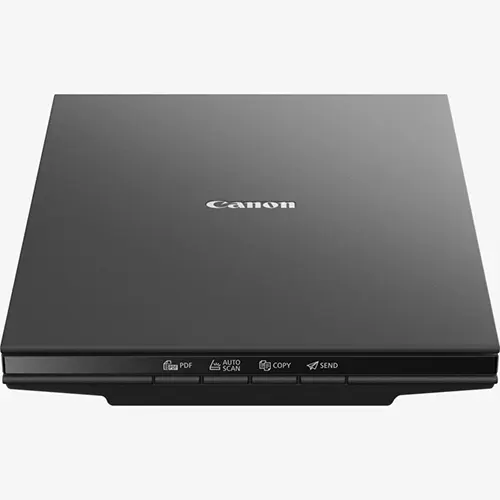
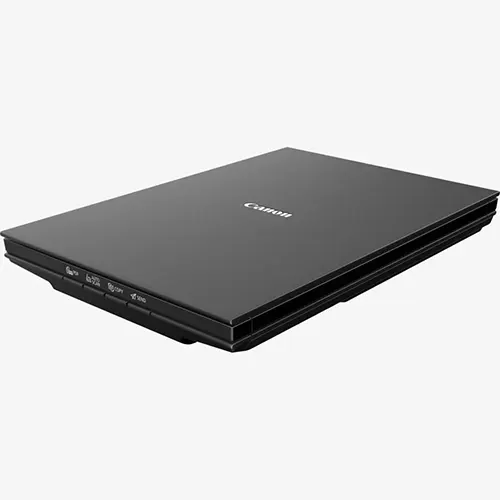

Canon CanoScan LiDE 300 A4 Flatbed Scanner
Discover the Canon CanoScan LiDE 300 A4 Flatbed Scanner. Compact, lightweight and USB-powered, it’s ideal for scanning documents and photos with ease.
£55.00 (ex. VAT) / £66.00 (inc. VAT)
+ Delivery - £10.00 (ex. VAT)/£12.00 (inc. VAT)
In stock for fast UK Dispatch
12 months free TechAssist support
1 year product warranty
Canon CanoScan LiDE 300 Overview
The Canon CanoScan LiDE 300 A4 Flatbed Scanner is a compact, lightweight and affordable scanning solution, ideal for home users, students and small offices.
Designed for everyday scanning, it delivers sharp, detailed results with up to 2400 dpi optical resolution, making it perfect for digitising documents, photographs and other printed materials.
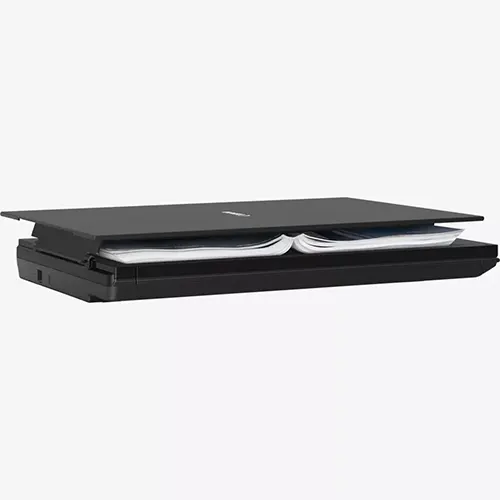
Easy to use, the LiDE 300 features four one-touch buttons for quick scanning, copying and PDF creation. Its innovative Z-Lid design allows thicker originals, such as books and magazines, to be scanned with ease.
With a slim, space-saving design and USB-powered operation, it offers convenient, reliable scanning without the need for a separate power supply.
Key Features of the Canon CanoScan LiDE 300
High-Resolution Scanning for Sharp, Detailed Results
The Canon CanoScan LiDE 300 delivers up to 2400 x 4800 dpi optical resolution, capturing fine details in photographs, documents and printed materials with excellent clarity.
Compact, Lightweight and Space-Saving Design
Designed for convenience, the Canon CanoScan LiDE 300 features a slim, lightweight construction that fits neatly into smaller workspaces and is easy to store when not in use.
Easy One-Touch Scanning with the Canon CanoScan LiDE 300
Four convenient EZ buttons make everyday scanning simple, allowing users to scan documents, create PDFs and copy originals quickly with minimal effort.
Simple USB Connectivity with the Canon CanoScan LiDE 300
A single USB connection provides both power and data transfer, eliminating the need for an additional power adapter and helping to keep your workspace free from unnecessary cables.
Versatile Scanning with Advanced Z-Lid Technology
The Canon CanoScan LiDE 300 features an advanced Z-Lid design that accommodates thicker originals, including books and magazines up to 21 mm thick, offering greater flexibility when scanning different materials.
The Canon CanoScan LiDE 300 is best for
Everyday scanning of A4 documents, photographs, letters and paperwork. Ideal for home users, students and small offices looking for a compact, affordable and easy-to-use flatbed scanner.
FAQs
What is the Canon CanoScan LiDE 300 best suited for?
The LiDE 300 is ideal for everyday scanning of A4 documents, photographs, letters, certificates and other printed materials. Its compact design and simple operation make it particularly suitable for home users, students and small offices.
Can I scan photographs with the LiDE 300?
Yes, with up to 2400 x 4800 dpi optical resolution, the scanner captures fine details in printed photographs. It’s a practical choice for digitising family photos, preserving memories and creating digital copies of printed images.
Can I scan books and magazines?
Yes, the advanced Z-Lid design allows the scanner lid to lift and accommodate thicker originals, including books and magazines up to 21 mm thick. This provides greater flexibility when scanning different types of material.
Does the Canon CanoScan LiDE 300 need a separate power supply?
No, the scanner is powered directly through its USB connection. A single cable handles both power and data transfer, eliminating the need for a separate power adapter and keeping your workspace tidy.
Can I create searchable PDF documents?
Yes, using Canon’s compatible scanning software, you can create PDF documents with searchable text through optical character recognition (OCR). This makes it easier to organise, search and retrieve scanned paperwork.
Technical Specification
| Scanner type | Flatbed |
| Flatbed scan area | 216 x 297 mm (Letter / A4) |
| Optical resolution | 2400 x 4800dpi |
| Sensor type | CIS |
| Light source | LED |
| Colour depth | Input: 48-bit colour, Output: 48/24 bits colour |
| Scan speed | 10 seconds (300 dpi colour) |
| Connectivity | USB 2.0 |
| Power supply | USB powered |
| Photo scanning | Yes |
| Book & album scanning | Yes |
| Removable lid | Yes |
| Film / negative scanning | No |
| OCR support | Yes |
| Included software | Canon Scanner Driver, IJ Scan Utility (Windows), IJ Scan Utility Lite (Mac), ScanGear MP, Quick Menu, OCR, Auto Scan, Document Scan, Photo Scan and Stitch Scan. |
| Features | Four EZ buttons, Advanced Z-Lid, Auto Scan Mode, high-speed scanning, automatic image enhancement, dust and scratch reduction, colour restoration, gutter shadow correction, OCR, multi-page PDF creation, digital filing, cloud scanning and USB-powered operation. |
| Supported file formats | JPEG (JPG), TIFF (TIF), PNG and PDF, including multi-page and searchable PDFs (OCR). |
| Operating system support | Windows, Mac & Linux |
| Dimensions | 250 × 367 × 42 mm (Width x Depth x Height) |
| Weight | 1.7 KG |
| Warranty | 12-month RTB parts warranty |
| What’s in the box | Main unit, Setup guide, USB cable. Warranty document |
For full technical details, please refer to the product datasheet.
Only logged in customers who have purchased this product may leave a review.

TechAssist - We've got you covered
Every hardware purchase from BDM ArcScan now includes 12 months of FREE TechAssist support, worth over £120.00.
TechAssist gives you direct access to our support team for help with setup, troubleshooting and everyday technical questions.
Support is available by email, phone or remote session, so we can guide you through issues quickly and help keep your scanner running smoothly.
Please Note – Product model images/videos shown may show/include additional options, accessories and/or features available at additional cost. For additional information, please refer to product key features, product specification table and datasheet information. Features, specifications, software, and any additional information provided may be subject to change or revision without notice.
Any automatic processing features and benefits mentioned are intended to aid user experience, but results may vary depending on your usage and the media being scanned. Any errors or inaccuracies with automatic processing features and benefits do not indicate an error with the functionality of the scanner.
Equipment performance, features and capabilities are based on using the equipment’s proprietary included software. The use of the equipment with any third-party software is not guaranteed or implied and guidance should be sought from the third-party software manufacturer or vendor to ensure compatibility with your intended usage. BDM ArcScan does not provide such advice, guidance, or support pre or post-sale.
Equipment features and benefits may vary depending on the operating system version, configuration, and type. As such, differences in functionality and available features may occur. Please refer to the datasheet and specification information of the equipment fully to check if any such differences exist, especially between Windows and Mac operating systems. E&OE.



Reviews