
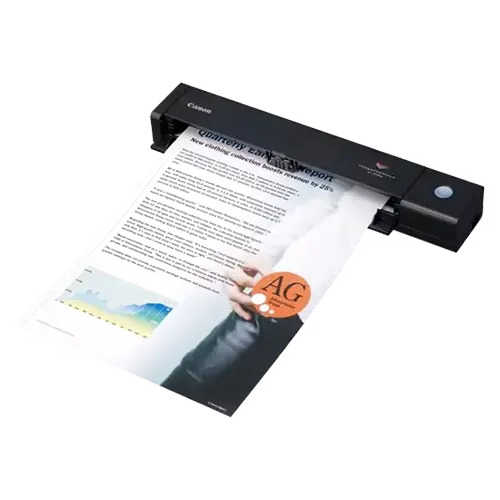



Canon imageFORMULA P-208 II Portable Duplex Document Scanner
Discover the Canon imageFORMULA P-208 II Portable Duplex Document Scanner. Compact and USB-powered, with fast double-sided scanning and a 10-sheet document feeder for scanning on the go.
£90.00 (ex. VAT) / £108.00 (inc. VAT)
+ Delivery - £10.00 (ex. VAT)/£12.00 (inc. VAT)
Out of stock
In stock for fast UK Dispatch
12 months free TechAssist support
1 year product warranty
Canon imageFORMULA P-208 II Overview
The Canon imageFORMULA P-208 II Portable Duplex Document Scanner is a compact, lightweight solution for scanning documents at home, in the office or on the move.
Delivering speeds of up to 8 pages per minute (16 images per minute), it features automatic double-sided scanning and a built-in 10-sheet document feeder for efficient everyday use.
Weighing just 600g, the P-208 II is easy to transport and operates through a single USB connection without requiring a separate power supply.
It supports A4 documents, receipts, photographs and plastic cards, while Canon’s CaptureOnTouch Lite software makes scanning quick and straightforward.
Key Features of the Canon imageFORMULA P-208 II
Compact and Lightweight Portable Design
Weighing just 600g, the Canon imageFORMULA P-208 II is designed for convenient scanning at home, in the office or on the move. Its slim, lightweight construction makes it easy to transport and store in smaller workspaces.
Fast and Efficient Double-Sided Scanning
The P-208 II delivers scanning speeds of up to 8 pages per minute (16 images per minute), capturing both sides of a document in a single pass. This helps reduce scanning time and improves everyday productivity.
Convenient 10-Sheet Automatic Document Feeder
The Canon imageFORMULA P-208 II features a built-in 10-sheet automatic document feeder (ADF), allowing multiple pages to be scanned without manually feeding each sheet, making everyday document scanning quicker and easier.
Canon imageFORMULA P-208 II with Simple USB Power
A single USB connection provides both power and data transfer, eliminating the need for a separate power adapter. The imageFORMULA P-208 II also includes CaptureOnTouch Lite software for easy scanning without installing additional drivers.
Versatile Document Handling with the Canon imageFORMULA P-208 II
Designed to handle a variety of everyday originals, the P-208 II supports A4 documents, receipts, photographs and plastic cards. Its flexible paper handling makes it a practical choice for mobile professionals and small offices.
The Canon imageFORMULA P-208 II is best for
Mobile professionals, remote workers and small offices needing fast, portable scanning of A4 documents, receipts, invoices and business cards. Ideal for scanning on the move or in limited workspaces.
FAQs
What is the Canon imageFORMULA P-208 II best suited for?
The P-208 II is ideal for mobile professionals, remote workers and small offices needing a compact, portable document scanner. It’s particularly well suited to digitising A4 documents, receipts, invoices and business cards, whether working at a desk or on the move.
Does the Canon imageFORMULA P-208 II scan both sides of a document?
Yes, the imageFORMULA P-208 II features automatic duplex scanning, capturing both sides of a document in a single pass. With speeds of up to 8 pages per minute (16 images per minute), it makes processing double-sided paperwork quick and efficient.
Does the scanner need a separate power supply?
No, the imageFORMULA P-208 II is powered directly through its USB connection, eliminating the need for an external power adapter. This makes it particularly convenient for use with laptops when working remotely or travelling.
Can I scan multiple pages automatically?
Yes, the built-in 10-sheet automatic document feeder (ADF) allows you to scan multiple pages without feeding each sheet individually. The Canon imageFORMULA P-208 II also supports multi-page PDF creation, helping you organise documents into a single file.
Can the Canon imageFORMULA P-208 II scan plastic cards and receipts?
Yes, the scanner supports a variety of document types, including receipts, business cards and plastic ID cards. Its flexible document handling makes it useful for capturing everyday paperwork and smaller originals without needing a separate scanner.
Technical Specification
| Scanner type | Portable Sheetfed |
| Min & max document width | 50.8 – 216mm |
| Min & max document length | 70 – 356mm |
| Min & max document thickness | 52 – 209g/m² (0.06 – 0.22mm) |
| Optical resolution | 600 dpi |
| Sensor type | CIS |
| Light source | LED |
| Colour depth | 24 bit colour/8-bit greyscale |
| Scan speed | 8ppm / 16ipm (colour & B&W) |
| Connectivity | USB 2.0 |
| Power supply | USB powered |
| Feeder capacity | Up to 10 sheets (A4) |
| Duplex scanning | Yes |
| Duty cycle | 50 to 250 scans per day |
| OCR support | Yes |
| Included software | ISIS /TWAIN Driver, CaptureOnTouch, CaptureOnTouch Lite |
| Features | Automatic page size and colour detection, deskew, image rotation, text enhancement, colour and contrast correction, blank page removal, background smoothing, bleed-through reduction, edge enhancement, moiré reduction, photo enhancement, continuous scanning, automatic cropping and double-feed detection. |
| Supported file formats | PDF, PDF/A, searchable PDF (OCR), JPEG, TIFF, PNG, BMP and PPTX (PowerPoint). |
| Operating system support | Windows, Mac |
| Dimensions | Tray Closed 312.5 (W) x 56.5 (D) x 40 (H)mm
Tray Opened: 312.5 (W) x 89.5 (D) x 40 (H)mm |
| Weight | 600 grams |
| Warranty | 12-month RTB parts warranty |
| What’s in the box | Main unit, Setup guide, USB cable. Warranty document |
For full technical details, please refer to the product datasheet.
Only logged in customers who have purchased this product may leave a review.

TechAssist - We've got you covered
Every hardware purchase from BDM ArcScan now includes 12 months of FREE TechAssist support, worth over £120.00.
TechAssist gives you direct access to our support team for help with setup, troubleshooting and everyday technical questions.
Support is available by email, phone or remote session, so we can guide you through issues quickly and help keep your scanner running smoothly.
Please Note – Product model images/videos shown may show/include additional options, accessories and/or features available at additional cost. For additional information, please refer to product key features, product specification table and datasheet information. Features, specifications, software, and any additional information provided may be subject to change or revision without notice.
Any automatic processing features and benefits mentioned are intended to aid user experience, but results may vary depending on your usage and the media being scanned. Any errors or inaccuracies with automatic processing features and benefits do not indicate an error with the functionality of the scanner.
Equipment performance, features and capabilities are based on using the equipment’s proprietary included software. The use of the equipment with any third-party software is not guaranteed or implied and guidance should be sought from the third-party software manufacturer or vendor to ensure compatibility with your intended usage. BDM ArcScan does not provide such advice, guidance, or support pre or post-sale.
Equipment features and benefits may vary depending on the operating system version, configuration, and type. As such, differences in functionality and available features may occur. Please refer to the datasheet and specification information of the equipment fully to check if any such differences exist, especially between Windows and Mac operating systems. E&OE.



Reviews