News – Ricoh Launches the New SP-2240N and SP-2230N Document Scanners
Ricoh has announced the launch of two new compact document scanners: the Ricoh SP-2240N and Ricoh SP-2230N for summer 2026.
Designed for everyday business scanning, these affordable new models help organisations digitise documents quickly, accurately and reliably without adding complexity to daily workflows.
Built on trusted Ricoh fi Series technology, the SP-2240N and SP-2230N give businesses a strong balance of performance, image quality and value.
With scanning speeds of up to 40 pages per minute on the SP-2240N and 30 pages per minute on the SP-2230N, they are ideal for teams that need dependable document capture for routine office tasks.

Ricoh SP-2240N and SP-2230N at a glance
Features
Scan Speed
ADF Capacity
Scan sizes
Connectivity
PC free scanning
Software
Price
Ricoh SP-2230N
Up to 30 ppm
80 sheets
Business documents, plastic cards, A3 folded documents from 27gsm to 413 gsm.
USB 3.2/Ethernet
Yes with DirectScan
PaperStream software suite included for capture, optimisation and scanner management.
£220.00 (ex. VAT) / £264.00 (inc. VAT)
Ricoh SP-2240N
Up to 40 ppm
80 sheets
Business documents, plastic cards, A3 folded documents from 27gsm to 413 gsm.
USB 3.2/Ethernet
Yes with DirectScan
PaperStream software suite included for capture, optimisation and scanner management.
£249.00 (ex. VAT) / £298.80 (inc. VAT)
Discover Affordable scanning for everyday business workflows with the new Ricoh SP-2240N and SP-2230N
Many organisations still spend valuable time handling, sorting and manually processing paper documents. The Ricoh SP-2240N and SP-2230N are designed to reduce that admin burden by making document digitisation faster and easier.
Both models are compact enough for space-restricted offices, yet powerful enough for regular daily use. An 80-sheet automatic document feeder helps busy teams scan batches efficiently, while versatile document handling supports standard business documents, plastic cards and even A3 documents folded in half.
Ricoh has also included Paper Protection technology with real-time image monitoring, helping prevent document damage and support smooth, uninterrupted scanning.

Simple one-click scanning from the PC or device
Ease of use is a major focus of the new Ricoh SP range. With enhanced PaperStream ClickScan software, users can scan and save documents quickly using a simple right-click “Scan” option.
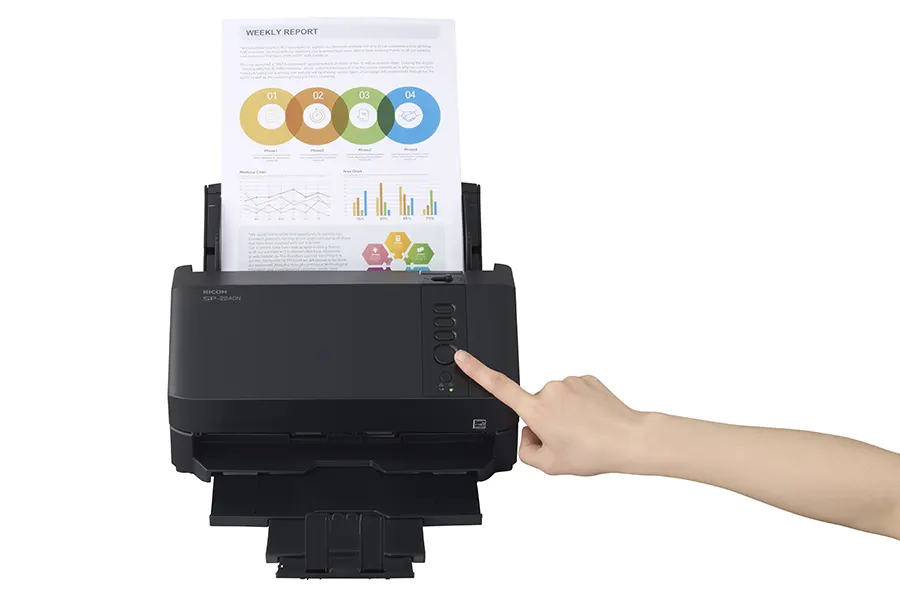
Scanning can also be started directly from the scanner using the on-device button, giving users a quick and intuitive way to digitise paperwork without unnecessary steps.
This makes the SP-2240N and SP-2230N particularly well suited to shared office environments, reception desks, admin teams and departments that need a straightforward scanning solution without a steep learning curve.
Ricoh SP-2240N and SP-2230N with Flexible PC-less scanning
Both models are powered by Ricoh’s iiGA next-generation System on a Chip, supporting enhanced DirectScan functionality for PC-free scanning directly from the device.
This allows users to scan documents to assigned destinations, such as save locations or email recipients, using the scanner’s three on-device buttons. Scanned files can also be attached to emails immediately, helping teams digitise and share information with fewer manual steps.
For multi-user workplaces, this creates a more flexible scanning experience and helps reduce reliance on individual PCs.
Clear, accurate scans with less manual correction
The SP-2240N and SP-2230N use advanced OCR and image processing to turn paper documents into usable digital information more efficiently. This helps reduce errors, manual corrections and delays further down the workflow.
Powered by PFU Clear Image Capture technology, the scanners deliver clean, consistent image quality across a wide range of document types. Intelligent image processing also manages adjustments such as paper size detection and automatic rotation, helping ensure scanned files are accurate and ready to use.
For businesses that rely on scanned documents for records, approvals, customer files or finance processes, this added accuracy can make a real difference to productivity.

The new Ricoh SP-2240N and SP-2230N are ideal for
Health Care
Scan patient records, referral forms, ID cards and mixed document batches quickly and securely.
Finance & Accounts
Capture invoices, receipts, statements, forms and financial records with ease.
Education
Scan student records, application forms, certificates, ID cards and administrative documents.
Government
Process forms, records, IDs and mixed paperwork for efficient digital archiving.
Retail & Hospitality
Handle till receipts, customer forms, plastic cards, delivery notes and back-office paperwork.
Legal
Digitise case files, contracts, evidence documents and client paperwork.
Need help choosing between the new Ricoh SP-2240N and SP-2230N?
Our team can help you compare both models and choose the right scanner for your workflow
Ricoh SP-2240N and SP2230N FAQs
What is the difference between the Ricoh SP-2240N and SP-2230N?
The main difference is scanning speed. The Ricoh SP-2240N scans at up to 40 pages per minute, while the Ricoh SP-2230N scans at up to 30 pages per minute. Both models are designed for reliable everyday business scanning, with compact designs, an 80-sheet automatic document feeder and flexible document handling.
Can the Ricoh SP-2240N and SP-2230N scan without a PC?
Yes, both scanners support PC-less scanning through Ricoh’s DirectScan function. This allows users to scan directly from the device to assigned destinations, such as folders or email recipients. A PC is required to configure the scanner settings.
Are these Ricoh scanners suitable for small offices?
Yes, the SP-2240N and SP-2230N are well suited to small offices and space-restricted workplaces. Their compact design, 80-sheet automatic document feeder and simple operation make them a practical choice for teams that need reliable document scanning without taking up unnecessary desk space.
What types of documents can the SP-2240N and SP-2230N scan?
The scanners can handle a range of everyday business documents, including standard paperwork, plastic cards and A3 documents folded in half. This makes them suitable for common office scanning tasks across departments such as admin, finance, HR and customer service.
Do the Ricoh SP-2240N and SP-2230N help reduce manual document processing?
Yes, both models are designed to make document digitisation faster and easier. Advanced OCR, intelligent image processing and automatic adjustments such as paper size detection and auto rotation help reduce manual corrections and improve workflow efficiency.
Are the Ricoh SP-2230N and SP-2240N replacements for the older SP Series scanners?
Yes. The Ricoh SP-2230N and SP-2240N are the newer SP Series models, replacing older scanners such as the SP-1120, SP-1125 and SP-1130. They offer updated performance, improved workflow features and a modern compact design for everyday office scanning.
Ready to upgrade?
Whether you need faster scanning for a busy team or an affordable desktop scanner for daily document capture, the new Ricoh SP-2240N and SP-2230N offer practical, feature-rich and easy-to-use scanning for businesses of all shapes and sizes.

Ricoh SP-2230N 30 ppm A4 Desktop ADF Network Scanner
£220.00 (ex. VAT) / £264.00 (inc. VAT)
Ricoh SP-2240N 40 ppm A4 Desktop ADF Network Scanner
£249.00 (ex. VAT) / £298.80 (inc. VAT)
Please Note – Product model images/videos shown may show/include additional options, accessories and/or features available at additional cost. For additional information, please refer to product key features, product specification table and datasheet information. Features, specifications, software, and any additional information provided may be subject to change or revision without notice.
Any automatic processing features and benefits mentioned are intended to aid user experience, but results may vary depending on your usage and the media being scanned. Any errors or inaccuracies with automatic processing features and benefits do not indicate an error with the functionality of the scanner.
Equipment performance, features and capabilities are based on using the equipment’s proprietary included software. The use of the equipment with any third-party software is not guaranteed or implied and guidance should be sought from the third-party software manufacturer or vendor to ensure compatibility with your intended usage. BDM ArcScan does not provide such advice, guidance, or support pre or post-sale.
Equipment features and benefits may vary depending on the operating system version, configuration, and type. As such, differences in functionality and available features may occur. Please refer to the datasheet and specification information of the equipment fully to check if any such differences exist, especially between Windows and Mac operating systems. E&OE.