Epson Flatbed Scanners
Versatile flatbed scanning for documents, photos and everyday originals
Epson flatbed scanners provide a reliable and versatile way to digitise documents, photographs, books and other originals with excellent image quality. Designed for different applications, they offer a practical scanning solution for home users, offices and professional environments.
From compact A4 flatbed scanners to high-performance A3 models, Epson offers solutions for everything from everyday paperwork to more demanding scanning requirements.
Unlike sheet-fed scanners, flatbed models allow originals to remain stationary on the scanning glass. This makes them particularly useful for capturing photographs, fragile documents, books, bound materials and other items that cannot safely pass through an automatic document feeder.
Depending on the model, features such as high optical resolution, advanced image processing and flexible connectivity help deliver detailed scans while simplifying your workflow.
Explore our range of Epson flatbed scanners at BDM ArcScan and find the right solution for your document types, scanning requirements and budget.
Looking for an Epson desktop scanner?
For fast, simple scanning of everyday documents using an ADF, explore our dedicated range of Epson document scanners for home and office use.

Epson Scanner Specialists
With specialist knowledge across the Epson scanner range, we’ll help you choose the right model for your requirements and workflow.
12-months TechAssist
Fast UK Delivery
With reliable UK delivery, we’ll help get your Epson scanner to you quickly so you can get up and running sooner.
Expert advice
With over 30 years of experience and knowledge, we provide expert guidance and support from initial enquiry through to installation and beyond.
Epson A4 Flatbed Scanners
Epson’s A4 flatbed range covers everything from photographs and everyday paperwork to regular business document capture.
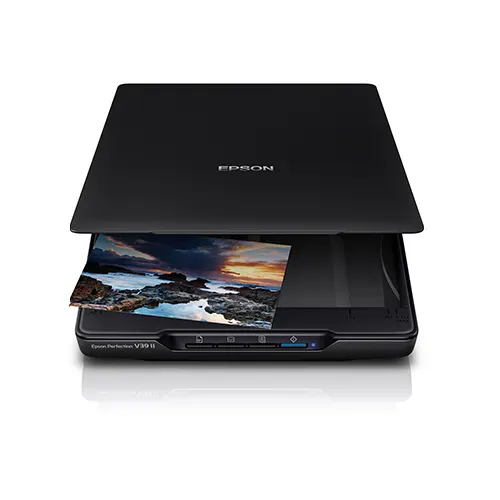
Epson Perfection V39II
Compact scanning for photos and everyday documents.
The Epson Perfection V39II is a slim A4 flatbed scanner with a high 4,800dpi optical resolution.
Its integrated stand allows it to be used horizontally or vertically, while USB connectivity helps keep desktop cabling to a minimum.
It is an excellent choice for photographs, personal documents, and occasional office scanning.
£94.00 (ex. VAT) / £112.80 (inc. VAT)

Epson WorkForce DS-1730
Versatile A4 scanning for home offices and businesses.
The WorkForce DS-1730 combines a flatbed with a 60-sheet automatic document feeder, giving users the flexibility to scan individual items from the glass or process batches of documents through the ADF.
The flatbed offers up to 1,200dpi optical resolution, making the DS-1730 suitable for standard paperwork as well as delicate or awkward originals.
£225.00 (ex. VAT) / £270.00 (inc. VAT)
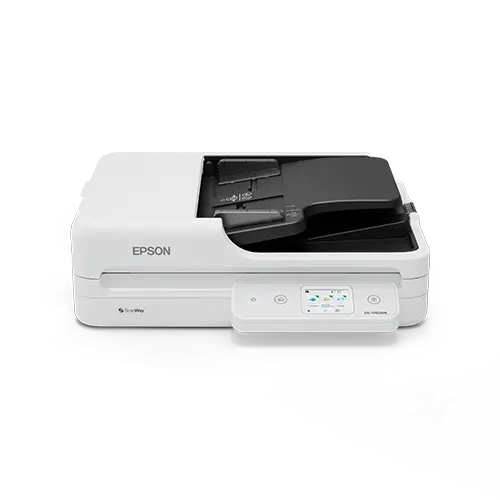
Epson WorkForce DS-1760WN
Shared flatbed scanning with network and Wi-Fi connectivity.
Designed for small businesses and workgroups, the WorkForce DS-1760WN combines A4 flatbed scanning with an automatic document feeder, integrated networking and Wi-Fi.
Multiple users can share the scanner, while the choice between the glass and document feeder provides greater flexibility when handling mixed document types.
£261.00 (ex. VAT) / £313.20 (inc. VAT)
Epson A3 Flatbed Scanners
For organisations that regularly work with larger documents, Epson’s A3 flatbed scanners provide the extra scanning area needed for plans, drawings, books, records and oversized paperwork.
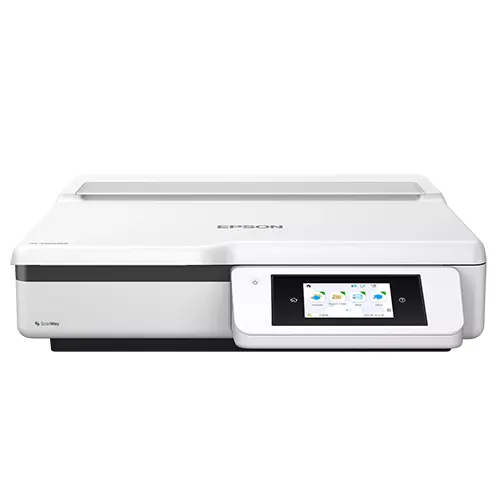
Epson WorkForce DS-51000WN
Flexible A3 flatbed scanning for professional workflows.
The WorkForce DS-51000WN is a dedicated A3 flatbed scanner designed for shared business environments.
Built-in network and Wi-Fi connectivity allow multiple users to access the scanner, while its large scanning surface handles documents from A3 down to much smaller originals.
A touchscreen interface also enables scanning without needing to operate the scanner directly from a PC.
£1,678.95 (ex. VAT) / £2,014.74 (inc. VAT)
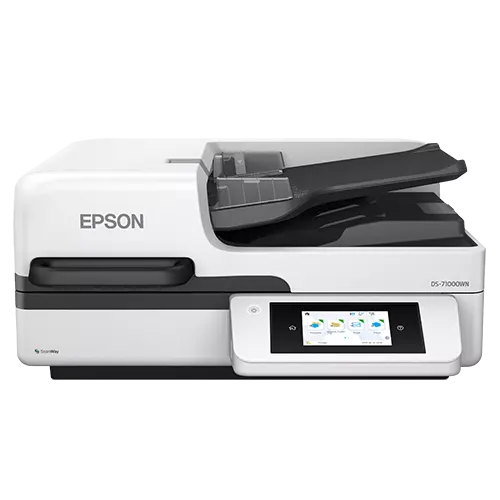
Epson WorkForce DS-71000WN
High-volume A3 flatbed and document scanning.
For organisations with heavier scanning requirements, the WorkForce DS-71000WN combines an A3 flatbed with a 150-sheet ADF.
It can scan at speeds of up to 70ppm and supports both A3 and A4 documents through the feeder, making it well suited to departments processing larger volumes of mixed paperwork.
Network connectivity and open-platform compatibility also make it easier to integrate the scanner into wider document management workflows.
£3,530.00 (ex. VAT) / £4,236.00 (inc. VAT)
Upgrade to a 3-year warranty – for FREE!
Buy a qualifying Epson product and enjoy 3 years of warranty cover at no extra cost. Simply register your eligible product with Epson within 30 days of purchase to activate the extended warranty and enjoy greater peace of mind. Terms and conditions apply.
Find out more here.
Compare Epson Flatbed Scanners
| Model | Size | Best For | ADF | Connectivity | Key Features |
|---|---|---|---|---|---|
| Epson Perfection V39II | A4 | Photos, letters, and occasional document scanning | No | USB | 4,800dpi optical resolution, compact design and USB-powered operation |
| Epson WorkForce DS-1730 | A4 | Everyday business scanning | 60-sheet ADF | USB | A4 flatbed with ADF for mixed documents and office paperwork |
| Epson WorkForce DS-1760WN | A4 | Shared office scanning | 60-sheet ADF | USB, Wi-Fi, Network | Network-ready A4 flatbed scanner for workgroups and multi-user environments |
| Epson WorkForce DS-51000WN | A3 | Professional A3 flatbed scanning | No | Wi-Fi, Network | Dedicated A3 flatbed scanning for larger originals and professional workflows |
| Epson WorkForce DS-71000WN | A3 | High-volume A3 scanning | 150-sheet ADF | Wi-Fi, Network | A3 flatbed with high-capacity ADF for busy departments and batch scanning |
Why Choose an Epson Flatbed Scanner?
Flexible document handling
Scan books, photographs, fragile items and other media quickly and easily
Flatbed and ADF options
Choose flatbed only or models with an ADF combined for fast batch scanning
Consistent, High-Quality Scanning
Epson’s CIS technology, with intelligent image optimisation, delivers clear, consistent scans
Latest connectivity options
Choose models with Wi-Fi and Ethernet connectivity for convenient shared scanning
Built for Everyday Business
Enjoy reliable performance and straightforward operation to keep workflows running
Epson Flatbed Scanners FAQ
Which Epson scanner should I choose?
For photographs and occasional A4 documents, the Epson Perfection V39II is the natural choice. For regular business scanning, the WorkForce DS-1730 combines flatbed scanning with an automatic document feeder, while the DS-1760WN adds network and Wi-Fi connectivity for shared use. If you need to scan A3 originals, the DS-51000WN provides dedicated A3 flatbed scanning, while the DS-71000WN combines an A3 flatbed with a high-capacity ADF for larger scanning workloads.
Should I choose an A4 or A3 Epson flatbed scanner?
Choose A4 if the majority of your originals are standard documents, photographs and other items up to A4 size. An A3 scanner is the better option for larger drawings, plans, ledgers, artwork or oversized documents that you want to capture in a single scan. If A3 scanning is only an occasional requirement, consider whether the extra size and cost of an A3 scanner is justified by your workflow.
Which Epson flatbed scanner is best for photographs and artwork?
The Perfection V39II is the photo-focused model in Epson’s current A4 flatbed range, offering 4,800dpi optical resolution and dedicated photo enhancement features. Epson’s current A3 WorkForce flatbeds are primarily designed for professional document capture rather than specialist photographic or graphics reproduction, as they now use CIS sensor technology rather than CCD, so the intended use is worth considering carefully when choosing an A3 model.
Can I scan books, photo albums and fragile documents?
Yes. One of the main advantages of a flatbed is the ability to scan originals that you would not want to pass through a document feeder. This can include books, bound documents, photographs, certificates and delicate or irregular items. The Perfection V39II also has a fully detachable lid to accommodate thicker books and photo albums.
Which Epson flatbed scanners have an automatic document feeder?
The WorkForce DS-1730 and DS-1760WN each combine an A4 flatbed with a 60-sheet automatic document feeder. For A3 scanning, the WorkForce DS-71000WN includes a 150-sheet ADF for processing larger batches of A3 and A4 documents. The Perfection V39II and WorkForce DS-51000WN are dedicated flatbed models without an ADF.
Which Epson flatbed scanners can be shared over a network?
The WorkForce DS-1760WN is designed for shared A4 scanning and includes integrated network and Wi-Fi connectivity. For A3 environments, both the DS-51000WN and DS-71000WN provide network connectivity, allowing the scanner to be accessed by multiple users. If the scanner will be used by several people or departments, a network-enabled model will usually be the more practical choice.
How much scanning resolution do I actually need?
That depends on what you are scanning. Standard business documents rarely need the same level of detail as photographs, artwork or originals intended for enlargement. Higher resolution can capture more detail, but it also produces larger files and can increase scanning and processing time. For this reason, it is better to choose a scanner based on the type of material you work with rather than simply selecting the model with the highest dpi figure.
Need Help Choosing the Right Epson Flatbed Scanner?
Epson flatbed scanners offer a versatile and reliable way to digitise documents, photographs, artwork and other originals with excellent image quality. From compact A4 models for everyday use to professional A3 scanners for more demanding applications, choosing the right equipment can help improve scanning quality, efficiency and productivity.
At BDM ArcScan, we offer a comprehensive range of Epson flatbed scanners to suit different applications and working environments. Whether you’re scanning delicate originals, managing business documents or digitising photographic collections, our team can help you find the right solution based on your document types, scanning requirements and budget.
Looking for an Epson Expression 13000XL Alternative?
If you are looking for the Epson Expression 13000 or 13000XL, these models were discontinued in 2025 and Epson did not introduce a direct replacement using the same CCD scanning technology.
Epson’s latest A3 flatbed scanners now use CIS technology, which is well suited to everyday document capture but does not offer the same characteristics as a CCD system. CCD scanners are typically preferred for demanding image reproduction because they offer greater depth of field and are better suited to capturing fine detail and tonal information from photographs, artwork and other specialist originals.
CIS scanners are also not designed for transparency media such as slides, negatives and film.
For users looking for an alternative to the Epson Expression 13000 series, the Microtek range of A4 and A3 flatbed scanners is well worth considering. Microtek continues to offer models based on CCD technology, making them particularly suitable for professional imaging, photographic, graphics and archival applications.
Selected models also support film, slide and negative scanning, providing a strong alternative for users who need capabilities no longer available in Epson’s current flatbed range.

Please Note – Product model images/videos shown may show/include additional options, accessories and/or features available at additional cost. For additional information, please refer to product key features, product specification table and datasheet information. Features, specifications, software, and any additional information provided may be subject to change or revision without notice.
Any automatic processing features and benefits mentioned are intended to aid user experience, but results may vary depending on your usage and the media being scanned. Any errors or inaccuracies with automatic processing features and benefits do not indicate an error with the functionality of the scanner.
Equipment performance, features and capabilities are based on using the equipment’s proprietary included software. The use of the equipment with any third-party software is not guaranteed or implied and guidance should be sought from the third-party software manufacturer or vendor to ensure compatibility with your intended usage. BDM ArcScan does not provide such advice, guidance, or support pre or post-sale.
Equipment features and benefits may vary depending on the operating system version, configuration, and type. As such, differences in functionality and available features may occur. Please refer to the datasheet and specification information of the equipment fully to check if any such differences exist, especially between Windows and Mac operating systems. E&OE.
Why buy from BDM ArcScan?
We’re more than just an online store — we’re document scanning specialists with over 30 years of experience. We work with all the key scanner brands and take pride in providing expert advice, personal service and ongoing support. From helping you choose the right equipment to 12 months of FREE TechAssist and our outsourced scanning bureau, we’re here to support you before, during and after your purchase.
Expert help choosing the right scanner
Not sure which Epson flatbed scanner is right for your needs? Our expert team can help you compare models and features, matching the right scanner to your requirements and workflow so you can choose with confidence.
12 months of TechAssist included
Every new scanner purchase comes with 12 months of TechAssist FREE, giving you priority telephone, email and remote support whenever you need a helping hand with setup, software or those little technical issues.
Let us take care of your scanning
Our outsourced document scanning bureau can handle everything from one-off archive projects to ongoing scanning requirements, helping you save time, free up space and reduce the burden on your internal team.